
TL;DR:
- Native mobile apps built with platform-specific tools provide superior performance and direct hardware access, essential for complex features like AR and biometric security. Although more costly initially, adopting strategies like Kotlin Multiplatform can balance native experience with development efficiency, minimizing duplication. Prioritizing native development for hardware-heavy or highly interactive apps ensures better user engagement, security, and smoother app store approval processes in 2026.
Not all mobile apps are built the same, and the difference matters more than most businesses realize. Native mobile apps, built specifically for iOS or Android using each platform's official tools, deliver a fundamentally different experience than hybrid or web-based alternatives. The confusion between these approaches costs entrepreneurs real money and user retention. This guide cuts through the noise, covering the 2026 technology standards, the genuine advantages of native apps, the hidden costs, and the strategic decisions that separate businesses with high-performing apps from those stuck patching a subpar experience.
Table of Contents
- Key takeaways
- What native mobile apps look like in 2026
- Why businesses choose native apps
- Challenges you should plan for
- Balancing native quality with development costs
- My honest take on native app strategy
- How Offcut can support your app journey
- FAQ
Key takeaways
| Point | Details |
|---|---|
| Native apps use platform tools | Swift for iOS and Kotlin for Android give apps direct hardware access and peak responsiveness. |
| Performance gap is real | Hybrid apps can cut costs by 30-50% but frequently compromise UI smoothness and user experience. |
| App store compliance is strict | Apple and Google reject apps missing distinct native features, complete content, or low-end device testing. |
| Kotlin Multiplatform is a middle path | Sharing 60-70% of business logic across platforms preserves native UI while reducing duplicated code. |
| Strategy beats cost alone | Choosing native vs hybrid should be driven by app complexity and hardware needs, not just budget. |
What native mobile apps look like in 2026
The technical foundation of native mobile apps has shifted considerably in the past two years. On iOS, Swift 6 with SwiftUI is now the baseline, while Android development has standardized on Kotlin 2.0 with Jetpack Compose. These are not incremental updates. Kotlin 2.0's K2 compiler effectively doubles compile speed, which translates to faster build cycles and measurably higher developer productivity.
What makes these tools significant for entrepreneurs is what they unlock at the hardware level. Native apps interact directly with device sensors, GPU resources, and system APIs without any abstraction layer sitting between your code and the device. That directness is why animation stays smooth at 60fps, why camera access feels instant, and why background processing actually works as expected.
One of the more interesting developments is Swift 6.3's official Android SDK for shared business logic. For the first time, teams working primarily in Swift can reuse core business code on Android without switching languages entirely. This changes the calculus for smaller engineering teams significantly.
| Factor | Native (iOS/Android) | Hybrid (React Native, Flutter) |
|---|---|---|
| Primary language | Swift / Kotlin | JavaScript / Dart |
| UI rendering | Platform-native | Custom engine or bridge |
| Hardware access | Full, direct | Partial via plugins |
| Performance ceiling | Highest | Moderate |
| Codebase | Two codebases | One shared codebase |
| App store compliance | Strongest | Requires extra configuration |
| Initial development cost | Higher | Lower by 30-50% |
Pro Tip: If your team is evaluating hybrid frameworks primarily on cost, run a simple benchmark of scroll performance and camera launch time on a mid-tier Android device before committing. The performance delta often shows up immediately, even in prototypes.
Why businesses choose native apps
The advantages of native apps are clearest when your product depends on hardware features or demands a premium user experience. Deep hardware features like AR or background processing require native development to function properly. A hybrid wrapper simply cannot access ARKit on iOS or deliver the kind of persistent background sync that enterprise operations require.
Beyond raw performance, the native app user experience carries platform-specific design conventions that users recognize instantly. Swipe gestures, haptic feedback, dynamic type scaling, and native navigation patterns all signal to users that the app was built for their device, not ported to it. That trust is hard to quantify but easy to lose.
Here are the best native app features that drive real engagement in 2026:
- Full camera API access, including RAW capture, multi-lens switching, and real-time AR overlays via ARKit or CameraX
- HealthKit and fitness sensor integration for wellness, medical, or fitness applications requiring accurate biometric data
- Push notification customization with rich media, actionable buttons, and time-sensitive delivery
- Face ID and biometric authentication tied directly to the Secure Enclave on iOS
- On-device machine learning using Core ML or TensorFlow Lite with no data leaving the device
- Offline-first architecture that syncs intelligently when connectivity resumes
Security is another concrete advantage. Apple rejects apps that merely wrap web content and lack a distinct native experience. That review standard, while frustrating for some developers, acts as a quality floor. It means users on the App Store and Google Play generally trust that native apps have passed meaningful scrutiny, which reflects well on your brand.
The engagement numbers support native investment. Users spend more time in apps with fluid animations, familiar navigation patterns, and fast load times. Each of these outcomes is easier to achieve and maintain when you build natively.

Challenges you should plan for
Choosing native development means accepting a higher upfront investment of time and money. You are building and maintaining two separate codebases, one for iOS and one for Android, each with its own UI design language, release cycle, and review process.
The design workload is not trivial. Human Interface Guidelines for iOS and Material Design for Android differ enough that a thoughtful native mobile app design process requires separate wireframing, interaction design review, and device-specific testing for each platform. Cutting corners here shows immediately in user reviews.
App store compliance is where many first-time deployments get stuck. Common rejection reasons include:
- Missing or expired demo credentials provided to reviewers, causing them to be unable to access key features
- Incomplete content or placeholder text left in the build submitted for review
- Insufficient explanation of permissions requested, such as why the app needs location or microphone access
- Crashes on low-end devices because testing only on high-end hardware misses performance issues that reviewers catch immediately
- Violation of App Store content policies, including in-app purchase flows that bypass platform billing
Google Play adds an additional requirement that catches new developers off guard. New personal developer accounts must complete a 14-day closed testing period with at least 12 engaged testers before production access is granted. Missing this step blocks your launch entirely.
Pro Tip: Write a reviewer notes document before you submit, not after. Explain every permission your app requests, include working demo credentials, and flag any features that require specific device states like Bluetooth on or location enabled. This single document reduces rejection risk more than most code improvements.
Regarding 2026 policy updates: both Apple and Google have tightened requirements around AI-generated content disclosure, subscription cancellation flows, and privacy manifest documentation on iOS. Build compliance checks into your release pipeline from day one rather than retrofitting them later.
Balancing native quality with development costs
The business case for going fully native on both platforms is strong, but not always necessary at every stage of a company's growth. The more practical question is how to get the native experience your users expect without doubling every engineering cost.
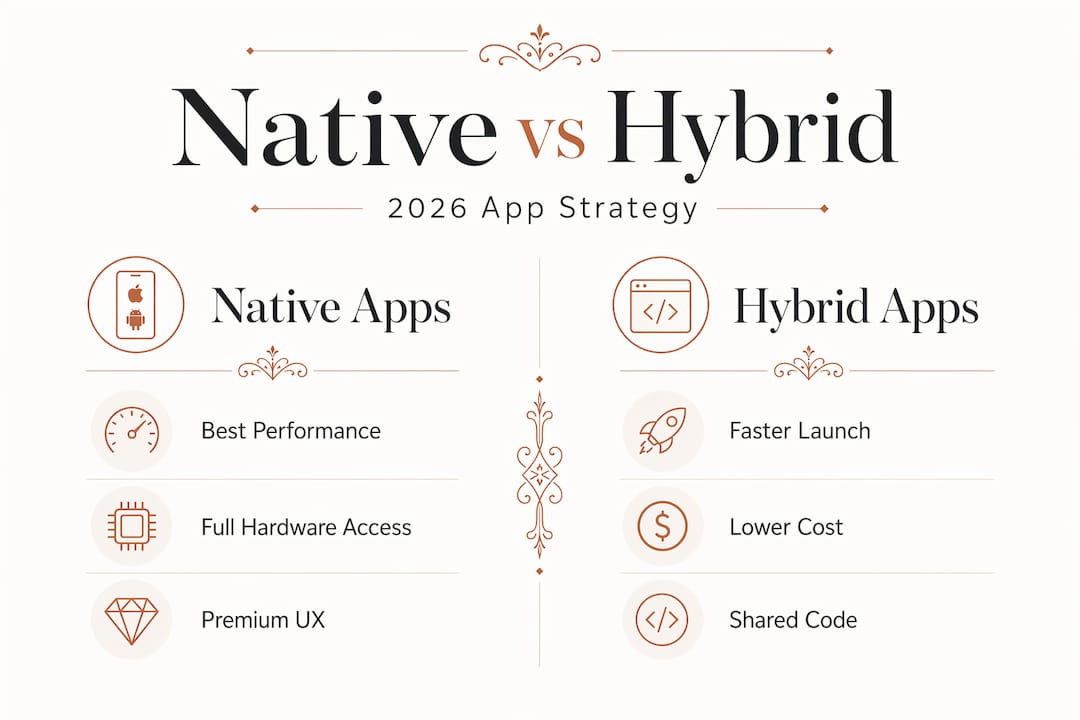
Kotlin Multiplatform has become the most credible answer to that question. By sharing 60-70% of business logic across iOS and Android while keeping each platform's UI fully native, teams eliminate the duplicated logic bugs that plague teams maintaining separate codebases. The networking layer, data models, authentication logic, and API client code live once and work everywhere.
The trade-offs are real though. CI pipelines for Kotlin Multiplatform projects require macOS runners for iOS builds and careful caching strategies to manage longer build times. The learning curve for iOS developers adopting Kotlin is non-trivial. And build complexity increases, which means your DevOps setup needs more attention than a single-platform project.
When should you go fully native versus adopting a hybrid-enhanced workflow? Consider these decision factors:
- Go fully native when your app depends on cutting-edge device APIs, when user experience is a primary differentiator, or when you operate in regulated industries where security and compliance are non-negotiable
- Use Kotlin Multiplatform when your app has substantial business logic shared across platforms and your team has Android expertise to anchor the shared module
- Consider hybrid frameworks only for content-driven, low-interaction apps where performance demands are modest and speed to market outweighs experience quality
| Approach | Code reuse | UI quality | Build complexity | Best for |
|---|---|---|---|---|
| Fully native | Low | Highest | Moderate | Premium, hardware-heavy apps |
| Kotlin Multiplatform | High (logic only) | High | High | Mature teams, complex business logic |
| Hybrid (React Native, Flutter) | Very high | Moderate | Low | Simple apps, rapid prototyping |
The choice between native and hybrid ultimately comes down to app complexity and hardware needs, not the initial budget line. Businesses that start with the wrong architecture because it was cheaper usually pay more to fix it later.
My honest take on native app strategy
I've watched enough product launches to have a clear perspective here: the businesses that regret going native are rare. The businesses that regret going hybrid when they needed native are common, and their complaints are always the same. Laggy animations, camera integrations that half-work, background sync that drains batteries. These are not small issues. They show up in your one-star reviews.
In my experience, the apps that truly benefit from full native investment are those where the device is doing real work: health tracking, AR experiences, anything involving real-time sensor data, or apps where the UX is the product itself. If your app is a dashboard for viewing reports, a hybrid approach is probably fine. If your app is how customers interact with your physical product, native is not optional.
I've also seen teams get burned by app store rejections that were entirely preventable. Missing demo credentials, skipping low-end device testing, not reading the latest policy updates before a major iOS release. These are process failures, not technical ones. Building a pre-submission checklist into your release workflow is one of the highest-leverage things a small team can do.
My advice for tech-savvy entrepreneurs in 2026 is to start with a native foundation on at least one platform, prove the product, and then expand deliberately with shared logic tools like Kotlin Multiplatform rather than trying to save money upfront with a hybrid approach that limits you later. Quality compounds. So does technical debt.
— Myles
How Offcut can support your app journey
Building a native mobile app is only part of the product story. The visual identity, packaging design, and brand assets that live inside and around your app matter just as much as the code. Offcut connects founders with print-ready, professionally designed concepts at a fraction of what agencies charge, so your product looks as polished as it performs.
If you are building a physical product that connects to a native app experience, the way apps transform CPG packaging design shows exactly how the digital and physical can work together. Offcut gives you access to design work that would otherwise sit unused on a designer's hard drive. Explore what's available at Offcut and find assets that match where your product is going, not just where it is today.
FAQ
What are native mobile apps?
Native mobile apps are built using platform-specific languages and SDKs, Swift and SwiftUI for iOS, and Kotlin with Jetpack Compose for Android. They access device hardware directly and follow each platform's official design guidelines.
What are the main advantages of native apps over hybrid?
Native apps offer better performance, full access to device APIs like ARKit and HealthKit, stronger app store compliance, and more reliable security features. Hybrid apps reduce costs but typically compromise UI responsiveness.
How do I create native apps without doubling my development costs?
Kotlin Multiplatform lets teams share 60-70% of business logic across iOS and Android while keeping each platform's UI fully native, reducing duplicated code without sacrificing the native experience users expect.
Why do native apps get rejected from app stores?
Common rejection reasons include missing demo credentials for reviewers, crashes on low-end devices, insufficient permission explanations, and placeholder content. Google Play also requires a 14-day closed testing period for new developer accounts before production access.
When should a business choose native over hybrid apps?
Choose native when your app uses complex hardware features, operates in a regulated industry, or when user experience quality is a primary competitive advantage. Hybrid frameworks work for content-driven apps where speed to market outweighs performance requirements.