
TL;DR:
- PostgreSQL is a versatile open-source database supporting SQL and JSON, suitable for various application needs. It offers multiple access methods, including psql, pgAdmin, and language bindings, each fitting different workflows. Proper configuration and understanding of its features are essential for optimizing performance and security in production environments.
PostgreSQL is an open source object-relational database system that supports both SQL and JSON querying, making it one of the most versatile database platforms available for web, mobile, geospatial, and analytics applications. Developers and data analysts who use PostgreSQL gain access to a system with over 35 years of active development, a strong community, and a feature set that rivals commercial databases at zero licensing cost. PostgreSQL 18 is the current release, and it introduces performance improvements and expanded developer tooling that make getting started with PostgreSQL more productive than ever. Tools like psql, pgAdmin, and a wide range of language bindings give you multiple entry points depending on your workflow.
How to use PostgreSQL: connecting to your database

PostgreSQL 18 offers three primary access methods: the psql terminal for interactive SQL, GUI frontends like pgAdmin for visual management, and application language bindings for embedding queries directly in code. Each method serves a distinct purpose, and choosing the right one early saves significant rework later.
Using psql for interactive queries
The psql terminal is the fastest way to get hands-on with a PostgreSQL database. You connect by running "psql` followed by the database name. By default, PostgreSQL attempts to connect to a database with the same name as your current operating system user, which catches many beginners off guard. Once connected, you get a prompt where you can type SQL commands directly.
psql meta-commands like \h provide inline SQL syntax help without leaving the terminal, and \q exits the session. These commands reduce the need to switch between your terminal and external documentation, which adds up to real productivity gains over a full workday. The \? command lists all available meta-commands, giving you a fast reference sheet at any point.
Pro Tip: Run \h SELECT inside psql to get the full SELECT syntax reference without opening a browser. This works for any SQL command and keeps your focus in the terminal.
GUI and application access
pgAdmin is the most widely used GUI frontend for PostgreSQL. It gives you a visual schema browser, query editor, and server monitoring tools in one interface. For teams that prefer visual workflows or need to onboard non-technical stakeholders, pgAdmin reduces the learning curve significantly.
Application language bindings connect PostgreSQL directly to your code. Python developers use psycopg2 or the newer psycopg3. Node.js developers rely on pg or Sequelize. Java applications connect through JDBC. These bindings let you write SQL inside your application logic, pass parameters safely, and handle result sets as native data structures. Choosing the right binding for your stack is one of the first decisions you make when integrating PostgreSQL into a production application.
- psql: Best for direct SQL interaction, scripting, and debugging
- pgAdmin: Best for schema management, visual query building, and server monitoring
- Language bindings: Best for embedding queries in application code
- ODBC/JDBC: Best for connecting PostgreSQL to BI tools like Tableau or Power BI
What SQL querying features do you need to master?
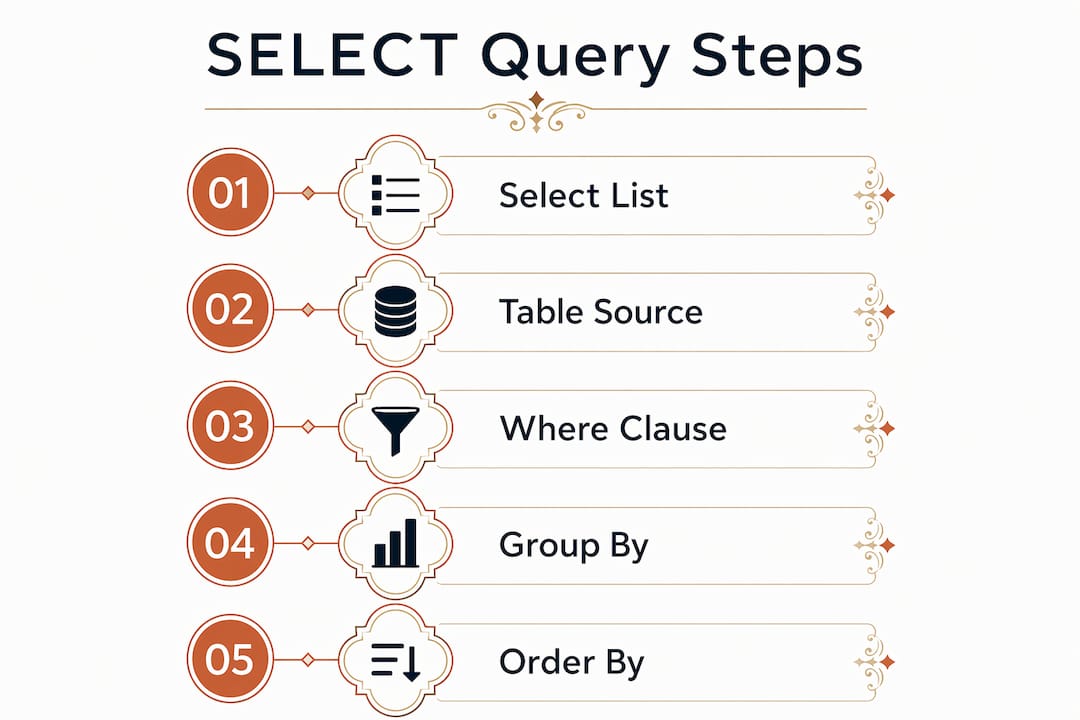
The basic SELECT statement in PostgreSQL follows a structure of select list, table list, and an optional WHERE clause. That simplicity is deceptive. The real power comes from combining filtering, sorting, deduplication, and Common Table Expressions into queries that handle complex analytical tasks cleanly.
Core SELECT operations
A query like SELECT * FROM weather WHERE city = 'San Francisco' AND prcp > 0.0 demonstrates the two most common filtering patterns: equality matching and numeric comparison. PostgreSQL supports the full Boolean logic set, including AND, OR, and NOT, which you can combine freely. Adding ORDER BY city sorts results alphabetically, and SELECT DISTINCT city removes duplicate rows from the output.
These four operations cover the majority of day-to-day query work. The order in which you apply them matters. WHERE filters rows before ORDER BY sorts them, and DISTINCT removes duplicates after the full result set is assembled. Misunderstanding that sequence is a common source of unexpected query results for developers new to SQL.
Common Table Expressions and recursive queries
WITH clauses define temporary result sets that exist only for the duration of a single SQL statement. They work like named subqueries but are far more readable when you need to chain multiple logical steps. A CTE named regional_sales can feed into a second CTE named top_regions, which then feeds the final SELECT. That structure makes complex queries auditable and maintainable.
Adding RECURSIVE to a WITH clause enables self-referencing queries. This unlocks operations that are impossible in standard SQL, such as traversing hierarchical data like organizational charts or bill-of-materials trees. Recursive WITH queries are also valid for data-modifying statements. You can use INSERT, UPDATE, or DELETE inside a CTE, which makes batch data transformations cleaner and more atomic.
Pro Tip: Use CTEs to break a complex analytical query into named steps. Each CTE becomes a self-documenting unit, which makes peer review and future debugging significantly faster.
Here is a comparison of the three main query structuring approaches:
| Approach | Best for | Readability | Performance note |
|---|---|---|---|
| Subquery | Simple one-off filters | Moderate | Can be slower on large sets |
| CTE (WITH) | Multi-step logic, recursion | High | Optimized in PostgreSQL 12+ |
| View | Reusable query logic | High | Depends on materialization |
How do you configure PostgreSQL for reliable performance?
PostgreSQL configuration lives primarily in two files: postgresql.conf for server parameters and pg_hba.conf for client authentication. Understanding which file controls what, and when changes take effect, is the difference between a stable production database and one that surprises you at 2 a.m.
Managing postgresql.conf
Parameters set in postgresql.conf control memory allocation, connection limits, logging behavior, and query planner settings. Some parameters take effect after a server reload. Others require a full restart. Confusing the two is a common operational mistake. Running SELECT pg_reload_conf(); applies reload-eligible changes without downtime, but parameters like max_connections require a restart and brief service interruption.
You can override static configuration at the session level using SET work_mem = '64MB'; or at the system level using ALTER SYSTEM SET shared_buffers = '2GB';. The ALTER SYSTEM command writes to postgresql.auto.conf, which takes precedence over postgresql.conf. That layering means you can have conflicting values across files if you are not careful about where changes are made.
Securing connections with pg_hba.conf
pg_hba.conf controls client authentication through sequential rule matching. PostgreSQL reads the file from top to bottom and applies the first rule that matches the incoming connection. If no rule matches, access is denied. That sequential logic means rule order is not cosmetic. Placing an overly permissive rule above a restrictive one effectively nullifies the restriction.
After editing pg_hba.conf, you must reload the server for changes to take effect. Skipping the reload is one of the most common causes of confusing authentication failures in development environments.
Tuning autovacuum
Autovacuum automatically runs VACUUM and ANALYZE to reclaim storage from deleted rows and refresh query planner statistics. Without it, tables accumulate bloat and query performance degrades over time. Autovacuum requires track_counts to be enabled. If that setting is off, autovacuum will not trigger correctly, and you will see table bloat accumulate silently.
Key tuning parameters include autovacuum_naptime, which sets how often the autovacuum daemon checks for work, and autovacuum_analyze_threshold, which controls how many row changes trigger an ANALYZE. You can override these settings per table using ALTER TABLE, which is useful for high-write tables that need more aggressive maintenance than the defaults provide.
- Set
autovacuum_naptimelower on high-write databases to catch bloat faster - Use
pg_stat_user_tablesto monitor dead tuple counts and confirm autovacuum is running - Override autovacuum settings per table for tables with unusual write patterns
- Always verify
track_counts = onbefore assuming autovacuum is functioning
Practical workflows and application integration
Integrating PostgreSQL into a real application involves more than writing queries. Table design, partitioning strategy, schema change management, and external tool connections all affect how well your database performs as the application scales.
Creating and partitioning tables
CREATE TABLE supports partitioning via PARTITION BY with three strategies: range, list, and hash. Range partitioning works well for time-series data where you split by date ranges. List partitioning suits categorical data like region or status. Hash partitioning distributes rows evenly across a fixed number of partitions, which helps with load balancing on large, uniform datasets.
Partitioning improves query performance by allowing PostgreSQL to skip entire partitions during a scan. A query filtering by a date range on a range-partitioned table only reads the relevant partitions, not the full table. That optimization becomes significant when tables exceed tens of millions of rows.
Connecting PostgreSQL to external tools and pipelines
PostgreSQL connects to data pipeline tools like Apache Airflow, dbt, and Airbyte through standard JDBC or native connectors. For packaging design workflows and CPG product management, teams managing database-backed design pipelines often use PostgreSQL as the source of truth for product metadata, version history, and asset tracking.
Schema changes in production require care. Tools like Flyway and Liquibase manage migration scripts with version control, so every schema change is tracked, repeatable, and reversible. Running raw ALTER TABLE commands directly in production without a migration tool is a practice that creates drift between environments and makes rollbacks painful.
| Integration type | Common tools | Use case |
|---|---|---|
| Data pipelines | Apache Airflow, dbt, Airbyte | ETL and transformation workflows |
| Schema migrations | Flyway, Liquibase | Version-controlled schema changes |
| BI and reporting | Tableau, Power BI via ODBC | Dashboards and analytics |
| Application ORM | SQLAlchemy, Sequelize, ActiveRecord | Embedded application queries |
The PostgreSQL tutorial sequence covers Parts I through IV, moving from basics to SQL depth and application development. Following that sequence gives you a structured path rather than jumping between disconnected resources.
Key takeaways
PostgreSQL rewards developers who invest in understanding its access methods, query structure, and configuration files before writing production code.
| Point | Details |
|---|---|
| Choose the right access method | Pick psql, pgAdmin, or language bindings based on whether you need interactive queries, visual management, or embedded application use. |
| Master CTEs for complex queries | WITH clauses and RECURSIVE queries handle multi-step logic and hierarchical data that subqueries cannot manage cleanly. |
| Understand config file layering | Changes in postgresql.auto.conf override postgresql.conf; know which parameters need a restart versus a reload. |
| Secure pg_hba.conf carefully | Rule order in pg_hba.conf is sequential and deterministic. A misplaced rule can silently override your security intent. |
| Tune autovacuum proactively | Verify track_counts is enabled and monitor dead tuple counts to prevent table bloat from degrading query performance. |
Why most PostgreSQL problems are configuration problems in disguise
I have watched developers spend days debugging slow queries when the real issue was a misconfigured work_mem setting or an autovacuum that had silently stopped running because track_counts was off. PostgreSQL is not a database that hides its complexity. It surfaces it through configuration, and that is actually a feature, not a flaw.
The tutorial sequence from the official docs is genuinely worth following in order. Most developers skip straight to the SQL reference and miss the foundational context that makes the configuration sections make sense later. I have seen that shortcut cost teams weeks of debugging time.
My honest recommendation: spend your first hour with psql and the meta-commands before touching pgAdmin. The terminal forces you to understand what is actually happening. GUI tools are excellent once you know the underlying mechanics, but they can mask important details when you are still learning. The \h command alone has saved me more time than any documentation site.
The other thing developers consistently underestimate is pg_hba.conf. It looks simple. It is not. Rule order in authentication config has a direct, deterministic effect on who can connect and how. Test every change in a staging environment before applying it to production, and always reload the server after edits. Forgetting the reload is the kind of mistake you only make once, but it is memorable.
— Myles
Build smarter workflows with PostgreSQL at the core
PostgreSQL powers some of the most demanding production applications in the world, and the same reliability applies to design and product management workflows. At Offcut, we work with founders and designers who need structured, database-backed systems to manage packaging concepts, version history, and print-ready assets at scale.
If you are building a workflow that connects PostgreSQL to your product or design pipeline, the guides at Offcut cover practical integration patterns for CPG and packaging teams. Explore how teams are using structured design workflows to manage assets more efficiently, or visit Offcut to see how print-ready packaging concepts are delivered without the agency overhead.
FAQ
What is PostgreSQL used for?
PostgreSQL is used for web applications, data analytics, geospatial systems, and mobile backends where reliable relational data storage and advanced querying are required. Its support for both SQL and JSON makes it suitable for structured and semi-structured data.
How do I connect to a PostgreSQL database?
You connect using the psql terminal, a GUI tool like pgAdmin, or a language binding such as psycopg3 for Python or pg for Node.js. The psql command defaults to a database named after your current operating system user if no database name is specified.
What are Common Table Expressions in PostgreSQL?
Common Table Expressions are temporary named result sets defined with a WITH clause that exist for the duration of a single SQL statement. Adding RECURSIVE allows the CTE to reference itself, enabling hierarchical and graph traversal queries.
How does pg_hba.conf affect database security?
pg_hba.conf defines client authentication rules that PostgreSQL matches sequentially from top to bottom. The first matching rule determines the authentication method, so rule order directly controls which users can connect and how they are verified.
When does autovacuum run in PostgreSQL?
Autovacuum runs automatically based on parameters like autovacuum_naptime and row change thresholds, but only when track_counts is enabled. It reclaims storage from deleted rows and refreshes query planner statistics to maintain query performance over time.