
TL;DR:
- Many IT teams mistakenly believe that SQL cloud simply involves relocating data to a remote server, but it actually offers fully managed relational database services that automate backups, scaling, and maintenance. These platforms enable organizations to focus on optimizing queries and schemas while handling infrastructure complexities, with platform choice depending on workload type and migration needs. AI-driven tools are transforming database management by automating query tuning, monitoring, and anomaly detection, significantly reducing manual workload and enhancing operational efficiency.
Most IT teams think SQL cloud just means moving an existing database to a remote server. That framing undersells the technology by a wide margin. SQL cloud, in practical terms, refers to fully managed relational database services hosted on cloud infrastructure. These platforms handle provisioning, patching, backups, and scaling automatically, freeing your team to focus on queries and schema design rather than server maintenance. For data professionals and IT decision-makers evaluating cloud SQL databases, the real question is not whether to migrate, but how to choose the right platform and architecture for your specific workload.
Table of Contents
- Key takeaways
- What SQL cloud actually gives you
- Comparing the major SQL cloud platforms
- Planning your SQL cloud migration
- AI and automation in SQL cloud management
- My honest take on SQL cloud adoption
- How Offcut can support your data infrastructure shift
- FAQ
Key takeaways
| Point | Details |
|---|---|
| Managed services reduce overhead | Cloud SQL platforms handle backups, patching, and failover automatically, cutting DBA maintenance time significantly. |
| Platform choice depends on workload | Azure SQL Database suits new cloud-native apps; Managed Instance fits legacy lift-and-shift migrations. |
| Migration frameworks accelerate deployment | Using structured frameworks like Microsoft Cloud Adoption Framework can provision environments 2.5x faster than traditional methods. |
| AI tools are reshaping DB management | Tools like Gemini Cloud Assist automate query tuning and index recommendations, reducing manual DBA workloads. |
| Security architecture matters early | Understanding data plane and control plane separation in managed instances is critical for configuring network access correctly from the start. |
What SQL cloud actually gives you
The clearest way to understand managed SQL cloud databases is to contrast them with running SQL Server on an EC2 instance or a bare metal server. On self-managed infrastructure, your team owns the full stack: OS patches, storage configuration, backup schedules, monitoring agents, and disaster recovery testing. Managed SQL services eliminate most of that. You define the instance size, connect your application, and the provider handles the rest.
Here is what a fully managed SQL cloud service typically includes:
- Automated backups and point-in-time recovery, with configurable retention windows
- Automated patching for both the database engine and the underlying OS
- Built-in monitoring and alerting with pre-configured dashboards
- High availability with automatic failover. Google Cloud SQL, for example, performs automated failover within 0 to 120 seconds on primary instance failure, with no manual intervention required
- Encryption at rest and in transit, enforced by default on major platforms
- IAM-based access control integrated with your cloud provider's identity layer
Scalability works differently too. On traditional infrastructure, scaling means provisioning new hardware, migrating data, and dealing with downtime windows. On cloud SQL platforms, vertical scaling is a configuration change. Horizontal read scaling via read replicas is a few clicks or an API call. That operational shift is what makes SQL on cloud solutions genuinely attractive to engineering teams managing growing data volumes.
Pro Tip: Do not mistake "managed" for "hands-off." You still own query performance, index strategy, and schema design. Managed services handle the infrastructure layer, not the application layer.
Comparing the major SQL cloud platforms
Choosing between platforms comes down to your existing stack, your team's expertise, and the specific features your workload requires. Here is a structured comparison of the three dominant options.
| Platform | Best for | Availability SLA | Free tier | Notable features |
|---|---|---|---|---|
| Google Cloud SQL Enterprise Plus | High-performance OLTP workloads | 99.99% | No | 35-day log retention, 4x read performance, disk cache, sub-second maintenance downtime |
| Azure SQL Database | New cloud-native applications | 99.99% | Yes | Free tier: 100,000 vCore seconds, 32 GB data monthly, up to 10 databases |
| Azure SQL Managed Instance | Lift-and-shift migrations needing SQL Server feature parity | 99.99% | No | Near-100% SQL Server compatibility, VNet-native deployment |
| Oracle OCI SQL | Enterprise Oracle workloads with AI integration | 99.95% | Limited trial | Managed MCP servers, OAuth 2.0 AI access |
A few distinctions worth understanding at a deeper level:
Azure SQL Database vs. Managed Instance is not just a pricing question. Azure SQL Database suits cloud-native apps built from scratch, while Managed Instance is designed for organizations migrating on-premises SQL Server workloads that depend on features like cross-database queries, SQL Server Agent, or linked servers. Picking the wrong tier can force expensive refactoring later.
Google Cloud SQL Enterprise Plus is worth the premium for latency-sensitive applications. The disk cache and 4x read performance improvement over the standard Enterprise tier make a measurable difference for applications with heavy read patterns, such as reporting dashboards or product catalogs.

Oracle OCI is expanding beyond its traditional stronghold. The platform now offers managed MCP servers for AI-driven SQL access secured via HTTPS and OAuth 2.0, which positions it well for organizations building AI agents that need governed database access.
Planning your SQL cloud migration
SQL cloud migration fails most often not during the technical execution, but during planning. Teams underestimate compatibility gaps, network architecture complexity, and the time required for application-level testing. Here is a structured approach that reduces those risks:
-
Audit your current workload. Catalog all databases, their sizes, dependencies, and SQL features in use. Tools like SQL Server Migration Assistant (SSMA) automate much of this discovery for Microsoft workloads.
-
Choose a migration framework. Standardized frameworks matter here. Organizations using the Microsoft Cloud Adoption Framework provision environments 2.5 times faster than teams working from scratch. The framework provides pre-built patterns for landing zones, networking, and governance that directly apply to SQL migrations.
-
Design your network architecture first. Both Azure SQL Managed Instance and Google Cloud SQL support private connectivity options. For Azure, the data plane resides in your subnet while the control plane stays in the managed Azure environment. This separation affects how you configure firewalls, private endpoints, and application access.
-
Secure your connections with proxy tools. For Google Cloud SQL, the Cloud SQL Auth Proxy is the recommended connection method. The proxy uses IAM for authorization with TLS 1.3 encryption and eliminates the need to manage database certificates manually. Critically, run the proxy on the same VM or container as your application so unencrypted traffic never leaves the host environment.
-
Test with production-like data volumes. Migration testing on small datasets consistently underestimates query execution times and lock contention at scale. Use a full or near-full copy of production data for final pre-migration testing.
-
Establish rollback criteria before you go live. Define specific thresholds, such as error rates and latency percentiles, that trigger a rollback. Having those defined in advance removes the subjective pressure during a live migration window.
Pro Tip: If you are migrating a CPG or product company's data infrastructure, cloud database security practices for storing design assets and documentation alongside SQL workloads can simplify your overall architecture from the start.
AI and automation in SQL cloud management
The operational gains from managed SQL services are well-established. What is newer, and genuinely worth attention, is how AI is changing the day-to-day work of database management on cloud platforms.
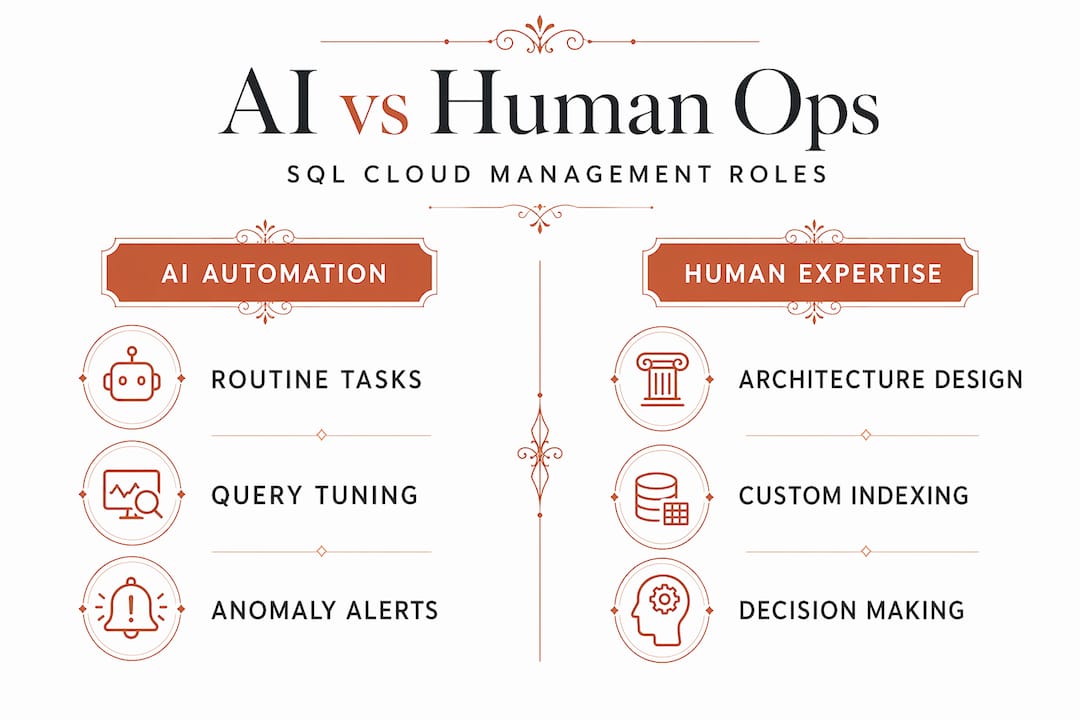
Gemini Cloud Assist brings AI-driven query optimization and index recommendations directly into the Google Cloud SQL console. Instead of a DBA manually reading query execution plans and hypothesizing about index changes, Gemini surfaces specific recommendations with projected performance impacts. For teams running dozens of microservices against a shared database, this kind of automated analysis replaces hours of manual work per week.
Beyond query optimization, cloud-native AI tools are addressing monitoring complexity:
- Query Insights on Google Cloud SQL identifies the top resource-consuming queries across all application users, helping teams prioritize optimization efforts
- System Insights provides anomaly detection for CPU, memory, and disk I/O, with alerts tuned to your instance's baseline behavior rather than static thresholds
- Oracle's managed MCP servers take this further, enabling AI agents to query Oracle databases directly using natural language while maintaining enterprise-grade governance through identity federation and OAuth 2.0
The practical implication for IT decision-makers is that the staffing calculus for cloud database teams is shifting. A smaller DBA team can manage a larger database footprint when AI tools are handling routine diagnostics and optimization recommendations. That does not mean eliminating DBA roles. It means redirecting their expertise toward architecture decisions and complex performance problems rather than routine monitoring.
My honest take on SQL cloud adoption
I have watched organizations overthink their cloud database strategy for months, debating managed versus unmanaged, multi-cloud versus single-provider, and landing in analysis paralysis while their on-premises licenses renew again. Here is what I have actually seen work.
Start with what you control. If your team has strong Azure expertise, Azure SQL Database or Managed Instance is almost always the right first move. Platform familiarity reduces migration risk more than any feature advantage from switching ecosystems.
The managed versus unmanaged debate is mostly settled now. The operational flexibility of managed instances over fully serverless database services gives most enterprise teams the control they actually need without the infrastructure overhead they do not want. I would only recommend running unmanaged SQL on cloud VMs if you have specific regulatory requirements around OS-level access or if you are running a database engine that lacks a managed cloud offering.
What I consistently see underestimated is the importance of getting network architecture right on day one. Once you have applications connected through public endpoints because it was faster to set up initially, retrofitting private connectivity is painful and disruptive. Spend the extra time early. Your security team and your future self will appreciate it.
Cloud-native tools are also genuinely worth using rather than replicating your on-premises monitoring stack in the cloud. Migrating Nagios or a custom monitoring script to a cloud VM when Query Insights and AI-driven anomaly detection are available natively is a step backward, not a safe migration.
— Myles
How Offcut can support your data infrastructure shift
When your organization is transitioning technology infrastructure, from on-premises databases to cloud SQL platforms, the design and documentation layer often lags behind the technical migration. Offcut bridges that gap for product and packaging teams who need their creative assets organized, accessible, and connected to modern cloud workflows.

Offcut gives founders and product teams access to print-ready, exclusive packaging design concepts at a fraction of agency cost, while ensuring designers get paid for work that would otherwise sit unused on a hard drive. For companies building or migrating their product design infrastructure, Offcut fits naturally into a cloud-first workflow where assets are versioned, accessible, and production-ready. If you are restructuring how your team stores and accesses design documentation alongside a cloud migration project, Offcut's packaging workflow resources show how creative and technical infrastructure can work together efficiently.
FAQ
What is SQL cloud in plain terms?
SQL cloud refers to relational database services hosted and managed on cloud infrastructure by a provider like Google, Microsoft, or Oracle. These services handle infrastructure tasks like patching, backups, and failover automatically, so your team manages data rather than servers.
Which SQL cloud platform is best for new applications?
Azure SQL Database is the strongest choice for new cloud-native applications, offering a free tier with 100,000 vCore seconds and 32 GB of data monthly. For lift-and-shift migrations from on-premises SQL Server, Azure SQL Managed Instance is a better fit due to its near-full SQL Server feature compatibility.
How secure are managed SQL cloud databases?
Managed SQL cloud services include encryption at rest and in transit by default. Platforms like Google Cloud SQL use the Cloud SQL Auth Proxy with TLS 1.3 and IAM-based authorization, while Oracle OCI supports OAuth 2.0 and identity federation for AI-driven database access.
How long does SQL cloud migration typically take?
Migration timelines vary significantly by workload size and complexity. Teams using structured frameworks like the Microsoft Cloud Adoption Framework complete environment provisioning 2.5 times faster than those without a framework, but application testing and cutover planning add time beyond infrastructure setup.
Can AI tools actually help with cloud SQL database management?
Yes, and the impact is practical rather than theoretical. Tools like Gemini Cloud Assist provide specific query optimization recommendations and index suggestions with projected performance impacts, while Query Insights identifies top resource-consuming queries automatically across your database fleet.