
TL;DR:
- SQL is the universal language for managing and querying structured data across various database systems, empowering users to control their data. Understanding core commands, relational models, optimization techniques, and security practices is essential for effective and secure data handling. Mastery of advanced features like views, CTEs, and metadata exploration enhances productivity and supports complex, real-world applications.
Most people assume SQL is a programmer's tool and nothing more. It isn't. SQL is the universal language for asking structured questions of your data, and it runs under the hood of nearly every application, analytics platform, and business intelligence system you've ever used. Whether you're a data analyst pulling weekly reports, a developer building a product backend, or a founder trying to understand your customer database, having solid SQL information puts you in control of your data rather than at the mercy of someone else's dashboard.
Table of Contents
- Key takeaways
- SQL information and the relational database model
- Core SQL commands and how to use them
- Query structure and performance best practices
- Security and data integrity in SQL databases
- Advanced SQL features and real-world applications
- My take on learning and using SQL well
- How Offcut thinks about data and design management
- FAQ
Key takeaways
| Point | Details |
|---|---|
| SQL is universal | It works across MySQL, PostgreSQL, Oracle, and more, making it the most transferable data skill you can learn. |
| Commands have clear categories | DDL, DML, DCL, and TCL each serve a distinct purpose, from building tables to controlling access. |
| Query efficiency matters | Selecting specific columns and using WHERE filters dramatically reduces server load and speeds up results. |
| Security is non-negotiable | SQL injection and poor access control remain leading causes of data breaches with real financial penalties in 2026. |
| Advanced features extend SQL's reach | Views, CTEs, and stored procedures let you tackle complex data problems without leaving the database. |
SQL information and the relational database model
Before writing a single query, you need to understand what you're querying. SQL is a declarative language developed by IBM in the 1970s for managing data in relational databases. The word "relational" is key. Data lives in tables, not documents or files, and those tables relate to each other through shared keys.
Think of a relational database as a collection of spreadsheets that talk to each other. But unlike a spreadsheet, a database table can hold millions of rows without slowing down, enforce rules about what data is allowed, and serve hundreds of users simultaneously. Relational databases store data in rows and columns and are built specifically for efficient querying at scale.
Here's what gives relational databases their structure and power:
- Tables are the fundamental unit of storage. Each table represents a single entity like customers, orders, or products.
- Rows represent individual records. One row in a "customers" table is one customer.
- Columns define the attributes of each record. For customers, that might be ID, name, email, and signup date.
- Primary keys uniquely identify every row in a table. No two rows can share a primary key value.
- Foreign keys link rows in one table to rows in another, creating the "relational" structure. An orders table might store a customer_id that references the customers table.
Normalization is the process of organizing these tables to eliminate redundant data. Instead of storing a customer's full address on every order record, you store it once in the customers table and reference it. This keeps data consistent and easier to maintain.
| Feature | Spreadsheet | Relational database |
|---|---|---|
| Scale | Thousands of rows practical | Millions to billions of rows |
| Relationships | Manual cross-sheet formulas | Built-in foreign keys |
| Data rules | Loose enforcement | Strict constraints (NOT NULL, UNIQUE) |
| Multi-user access | Difficult to manage | Native concurrency handling |
| Query language | Formula-based | Structured SQL |
Core SQL commands and how to use them
SQL commands fall into four categories: DDL, DML, DCL, and TCL. Each category controls a different layer of your database interaction.
-
DDL (Data Definition Language) defines the structure of your database. "CREATE TABLE
,ALTER TABLE, andDROP TABLE` all live here. You use DDL to build or modify the schema before any data enters the system. -
DML (Data Manipulation Language) handles the actual data.
SELECTretrieves records,INSERTadds new ones,UPDATEmodifies existing rows, andDELETEremoves them. DML is what most people use day-to-day. -
DCL (Data Control Language) manages who can do what.
GRANTgives a user permission to read or write specific tables, whileREVOKEtakes it away. This is your first line of defense for access control. -
TCL (Transaction Control Language) keeps multi-step operations safe.
COMMITsaves changes permanently, andROLLBACKundoes them if something goes wrong mid-transaction.
A basic SELECT query looks like this:
SELECT name, email FROM customers WHERE signup_date > '2025-01-01' ORDER BY signup_date DESC;
This retrieves two columns from the customers table, filters to recent signups, and sorts by date. SQL's declarative nature means you describe the result you want and let the database engine figure out how to get it.
Joins are where SQL gets genuinely powerful. An INNER JOIN combines rows from two tables where a condition matches:
SELECT customers.name, orders.total FROM customers INNER JOIN orders ON customers.id = orders.customer_id;
Aggregations like COUNT, SUM, AVG, and GROUP BY let you summarize data across thousands of rows in a single query. A sales analyst might run SELECT product_id, SUM(revenue) FROM orders GROUP BY product_id to see revenue by product instantly.
Pro Tip: Start every new query by reading the table structure with DESCRIBE table_name or querying the information schema. Knowing your column names and data types before you write prevents most syntax errors before they happen.
Query structure and performance best practices
Writing a query that works and writing a query that performs well are two very different things. When your database holds ten rows, both look the same. At ten million rows, the difference can be the gap between a one-second response and a thirty-second timeout.
The single biggest improvement most beginners can make is dropping SELECT *. Selecting specific columns instead of all of them reduces the amount of data the server reads, transfers, and returns. If you only need a customer's name and email, ask for exactly those. The server doesn't need to pull their address, phone number, and profile picture along for the ride.
The next lever is indexes. An index on a column works like a book's index. Instead of scanning every row to find matches, indexes allow searching without scanning entire tables. Add indexes to columns you filter or join on frequently. A missing index on a WHERE clause column is one of the most common causes of slow queries in production databases.
The database query optimizer does a lot of invisible work on your behalf. The optimizer assigns costs to execution plans and picks the least expensive one based on statistics about your data size and distribution. You cooperate with the optimizer by keeping your statistics current, writing sargable WHERE conditions (ones the index can actually use), and avoiding functions on indexed columns inside WHERE clauses.
Common performance pitfalls to avoid:
- Running queries inside loops instead of using a single set-based operation
- Using
LIKE '%keyword%'with a leading wildcard, which forces a full table scan - Fetching large result sets and filtering in application code instead of in the query
- Joining on columns with mismatched data types, which bypasses index use
Pro Tip: Use EXPLAIN or EXPLAIN ANALYZE before running any query on a large table. The execution plan shows you exactly how the database intends to process your query, so you can spot a full table scan before it hits production.
Security and data integrity in SQL databases
SQL databases hold some of the most sensitive data in any organization: customer records, financial transactions, healthcare information, and credentials. Getting security wrong has measurable consequences.

In 2026, a SQL injection breach exposed nearly 28,000 customers and resulted in over $430,000 in regulatory penalties. SQL injection happens when an attacker inserts malicious SQL code into an input field, and the database executes it as a legitimate query. It remains one of the most exploited vulnerabilities in web-facing applications.
Protecting your database starts with these practical measures:
- Use parameterized queries instead of building SQL strings with user input. Parameterized queries treat input as data, not as executable code.
- Apply GRANT and REVOKE carefully. Give each user or application account only the permissions it actually needs. A read-only analytics role should never have
DELETEpermission. - Enforce data integrity constraints. PRIMARY KEY, FOREIGN KEY, UNIQUE, and NOT NULL constraints prevent bad data from entering the system in the first place, which reduces both bugs and potential attack surfaces.
- Audit and rotate credentials regularly. Stale credentials sitting in old configuration files are a common entry point for breaches.
One nuance worth knowing: SQLite, which is widely used in mobile apps and embedded systems, relies on file-level security rather than GRANT/REVOKE because it trusts the operating system's file permissions. That means access control happens outside the database itself, which is a meaningful architectural difference from server-based systems like PostgreSQL or MySQL.
Advanced SQL features and real-world applications
Once you move past basic CRUD operations, SQL opens up considerably. Several features separate analysts and developers who use SQL as a productivity multiplier from those who use it as a simple lookup tool.
Views are saved queries stored as virtual tables. Instead of rewriting a complex join every time, you create the view once and query it like a regular table. Views also add a security layer by exposing only specific columns to specific users.
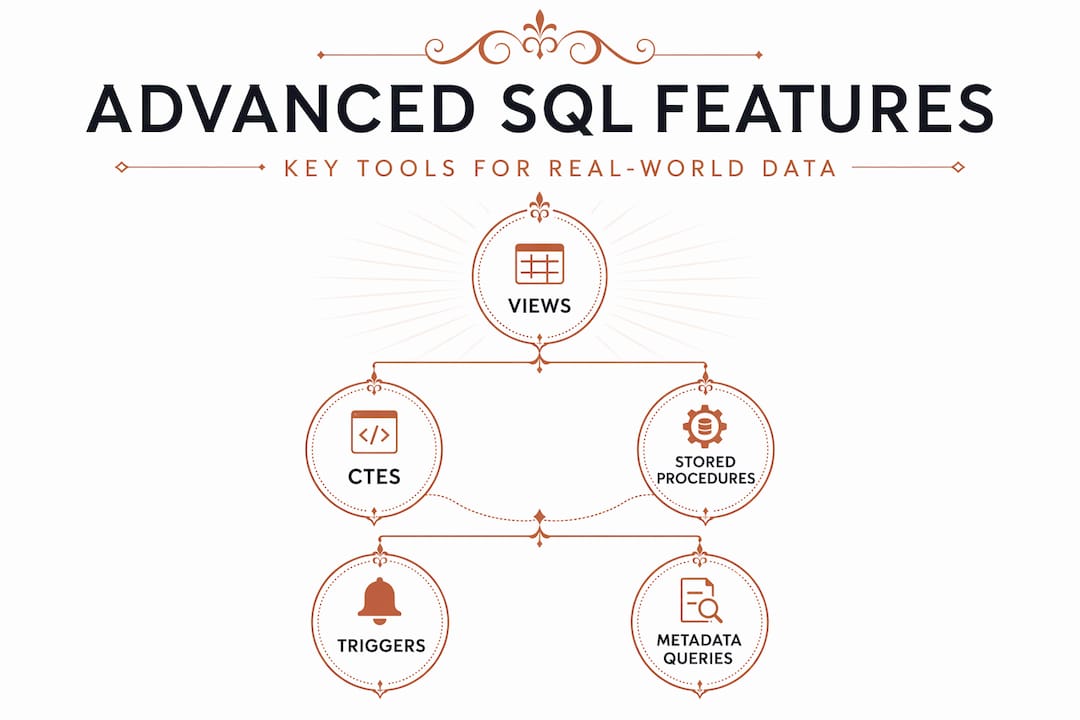
Common Table Expressions (CTEs) let you break a complex query into named, readable steps using the WITH keyword. A CTE makes a multi-join aggregation readable rather than nesting subqueries three levels deep.
Stored procedures are precompiled SQL logic saved in the database. They run faster than ad-hoc queries for repeated operations, and they centralize business logic rather than scattering it across application code.
Triggers fire automatically when specific events occur, like inserting a new record. They're useful for audit logging or enforcing business rules at the database level.
Querying metadata is another underused capability. The Information Schema provides a standardized way to discover tables, column names, and data types programmatically. This is particularly useful when you're exploring an unfamiliar database or building tools that need to adapt to schema changes automatically.
| Use case | SQL application |
|---|---|
| Business intelligence | Aggregating sales and user behavior data for dashboards |
| Web development | Powering user accounts, content, and transactions |
| Finance | Auditing transactions, detecting anomalies, generating reports |
| Scientific research | Managing experimental datasets and running statistical queries |
| Packaging and product data | Storing SKU specs, design versions, and supplier information |
SQL versus NoSQL is a common question. NoSQL databases like MongoDB handle unstructured or highly variable data well. SQL wins when your data has clear relationships, you need strong consistency, and you want the power of complex multi-table queries. Most production environments actually use both.
My take on learning and using SQL well
I've spent years watching developers and analysts work with SQL, and the pattern I keep seeing is this: people learn just enough SQL to get their ORM working or their report running, then stop. That ceiling costs them in ways they don't immediately recognize.
Mastering SQL query writing rather than relying on abstraction layers pays off at the exact moment it matters most, which is when something breaks in production or a query suddenly takes forty seconds instead of one. Understanding indexes, execution plans, and join strategies isn't advanced knowledge reserved for database administrators. It's the baseline for anyone working with data seriously.
The security angle is where I've seen the most avoidable damage. Developers who understand SQL injection write parameterized queries by default. Those who don't understand it skip that step once under deadline pressure and create a vulnerability that lives in their codebase for years. The 2026 breach I mentioned earlier wasn't a sophisticated attack. It was a preventable lapse.
My practical advice: treat SQL as a core literacy skill, not a support tool. Spend time with real query plans, read your database's own documentation rather than only tutorials, and build the habit of thinking about what data you actually need before you write the query that fetches it.
— Myles
How Offcut thinks about data and design management
Managing design assets at scale has more in common with database management than most people expect. The same principles that make SQL databases reliable, clean schemas, clear access control, and no redundant data, apply directly to how you handle packaging specs, versioning, and supplier files.

At Offcut, the platform is built for founders and designers who want their creative work organized, accessible, and protected rather than buried on a hard drive or scattered across email threads. If you're exploring how better packaging design workflows connect to the kind of structured data management SQL enables, Offcut's resources go deeper on that intersection. And if you're ready to put professional, print-ready packaging concepts to work, explore what Offcut offers for your brand.
FAQ
What is SQL used for in data management?
SQL is used to create, query, update, and delete data in relational databases. It powers everything from web applications to business intelligence dashboards and financial reporting systems.
What are the main categories of SQL commands?
The four main categories are DDL (structure), DML (data manipulation), DCL (access control), and TCL (transaction management). Each category handles a distinct layer of database interaction.
How does SQL injection work and how do you prevent it?
SQL injection inserts malicious code into input fields that the database then executes. You prevent it by using parameterized queries, which treat all user input as data rather than executable SQL.
What is the difference between SQL and NoSQL?
SQL databases use structured tables with fixed schemas and excel at complex relational queries. NoSQL databases handle unstructured or variable data but typically sacrifice the query power and strict consistency SQL provides.
What is the Information Schema in SQL?
The Information Schema is a standardized metadata layer available in most SQL databases. It lets you query table names, column definitions, and data types programmatically, which is useful for database exploration and building adaptive tools.