
TL;DR:
- A digital proof is an electronic review tool that verifies layout, content, and file structure before printing to prevent costly errors. It functions as a content validation step, while physical proofs confirm color and material fidelity, and digital provenance ensures file integrity and origin. Combining digital signatures, proper workflows, and physical proofs is essential for accurate, legal, and high-quality packaging production.
A digital proof is an electronic representation of a design used for pre-production review, letting you verify layout, content, and colors before committing materials to print. For packaging designers and marketing professionals, understanding digital proof meaning goes far beyond simply opening a PDF. It defines how errors get caught, how approvals get documented, and how production costs stay under control. Tools like Adobe Acrobat, GlobalVision, and PageProof have made digital proofing a standard step in CPG packaging workflows. This article covers how digital proofs work, where they fall short, and how to use them without costly surprises.
What is digital proof and how does it work in packaging workflows?
A digital proof is an electronic pre-production review tool that replaces or supplements physical test prints in design and print workflows. It captures the intended layout, typography, color values, and content of a file so all stakeholders can review and approve before production begins. The goal is to catch errors early, when fixing them costs minutes instead of thousands of dollars in reprints.
The standard workflow moves through four stages: generation, distribution, annotation, and approval.
- Generation. The designer exports a print-ready file, typically a PDF with embedded color profiles and bleed marks, from tools like Adobe InDesign or Illustrator.
- Distribution. The file is shared through an online proofing platform such as PageProof, Ziflow, or Filestage, or sent directly as a PDF via email.
- Annotation. Reviewers add comments, mark corrections, and flag issues directly on the file. Centralizing feedback on one version eliminates the confusion of scattered email threads.
- Approval. Once all corrections are resolved, the approver signs off digitally. This digital signing links the approver's identity to a specific proof version and timestamp, creating a legally traceable record.
Digital proofs also centralize review comments and annotations on a unified version, which reduces rework and miscommunication in packaging projects. For CPG brands managing multiple SKUs across regional markets, this matters enormously. A single misplaced allergen statement or wrong barcode caught at the proof stage costs nothing. The same error caught after a print run can cost tens of thousands of dollars.
Pro Tip: Always embed the correct ICC color profile in your PDF before distributing a digital proof. Reviewers viewing the file on uncalibrated monitors will otherwise see color shifts that do not exist in the final print.

Digital proof vs. physical proof vs. digital provenance
These three terms get confused regularly, and the confusion leads to real production problems. Each serves a distinct purpose in the design and print process.
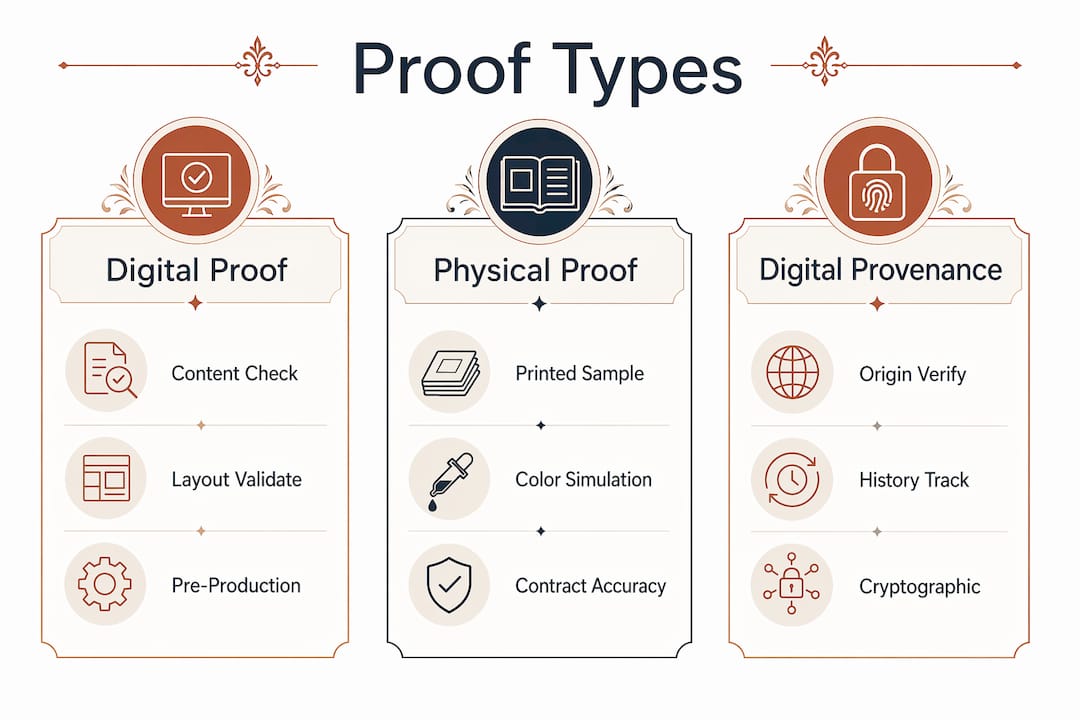
Digital proof is a content and layout validation tool. It confirms that text is correct, images are placed accurately, barcodes are present, and the file structure matches the brief. It does not guarantee how ink will look on a specific substrate.
Physical proof is a printed sample produced under controlled conditions to simulate the final product. Contract color proofs, press proofs, and printed mockups fall into this category. Physical press proofs are required for projects involving metallic foils, specialty substrates, or precise Pantone color matching. A digital proof cannot replicate the way a matte laminate absorbs ink differently than a gloss film, or how a gold foil reads under retail lighting.
Digital provenance is a separate concept entirely. It refers to technology that verifies the origin and history of a digital asset using cryptographic hashing and timestamps. Where a digital proof answers "does this file look correct?", digital provenance answers "where did this file come from, and has it been altered?" Regulations like the EU AI Act are accelerating adoption of digital provenance standards across creative industries.
| Feature | Digital proof | Physical proof | Digital provenance |
|---|---|---|---|
| Primary purpose | Content and layout review | Color and material validation | Asset origin and integrity verification |
| Format | PDF, online platform | Printed sample | Cryptographic hash and audit trail |
| Color accuracy | Approximate, monitor-dependent | High, substrate-accurate | Not applicable |
| Required for print approval | Yes, always | For color-critical projects | For IP protection and compliance |
| Cost | Low | Moderate to high | Low to moderate |
Key distinctions to keep in mind:
- Digital proofs confirm what is on the file, not how it will print on a specific material.
- Physical proofs are non-negotiable for packaging with tactile finishes, metallic inks, or tight color tolerances.
- Digital provenance protects your intellectual property and supports dispute resolution, not production quality.
What legal and technical elements define digital proof of document integrity?
Beyond design review, the phrase "digital proof" carries a second meaning in legal and technical contexts. Digital proof of document integrity uses cryptographic techniques to confirm that a file has not been altered after a specific point in time. For packaging designers and marketing teams, this matters when protecting original artwork, resolving supplier disputes, or demonstrating compliance with brand guidelines.
The core technical elements are:
- Hashing. A cryptographic algorithm converts a file into a unique fixed-length string called a hash. Any change to the file, even a single pixel, produces a completely different hash. This makes tampering detectable.
- Timestamps. A trusted timestamp records when a file existed in a specific state. Standards like the eIDAS regulation in the EU and the ESIGN Act in the United States give qualified electronic timestamps legal standing in commercial disputes.
- Digital signatures. A digital signature binds the signer's identity to the file at a specific moment. In proof approval workflows, this transforms an informal email sign-off into an auditable record.
- Blockchain anchoring. Anchoring file hashes to blockchains like Bitcoin via services such as OpenTimestamps prevents backdating and manipulation. Because the blockchain is decentralized, no single party can alter the record.
Verified digital proofs supported a 45% increase in cyber fraud convictions by providing immutable evidence of approval and timestamp. That figure reflects how seriously courts and regulators now treat cryptographic proof records. For packaging teams managing high-value brand assets across multiple agencies and suppliers, building this kind of audit trail is no longer optional.
Pro Tip: When submitting final artwork to a printer or co-manufacturer, generate a SHA-256 hash of your approved file and record it alongside the approval timestamp. If a dispute arises over which version was approved, you have irrefutable evidence.
Common pitfalls and best practices when using digital proofs
The most expensive mistake in packaging production is treating a digital proof as a finished product simulation. Digital proofs are content and layout approval tools, not physical samples. Professionals who understand this distinction avoid the majority of post-production disputes.
Common pitfalls to avoid:
- Skipping physical proofs on color-critical work. Metallic foils, spot UV coatings, and Pantone-matched colors require a physical contract proof. No monitor, however well-calibrated, replicates substrate behavior.
- Approving proofs on uncalibrated displays. A designer reviewing a proof on a standard laptop screen and a client reviewing the same file on a wide-gamut monitor will see different colors. Using calibrated displays and embedding color profiles in digital proofs reduces this gap significantly.
- Informal approval processes. Email replies like "looks good!" create no audit trail. Platforms like PageProof and Ziflow generate timestamped, identity-linked approval records that protect all parties.
- Version confusion. Distributing multiple proof versions without clear version control leads to approving outdated files. Always label proof versions explicitly and archive superseded versions.
"A digital proof is not a promise of what the final print will look like. It is a confirmation that the right content is in the right place."
Best practices that consistently reduce cost and rework:
Establish a single source of truth for each proof version and require digital sign-off before any file moves to production. For CPG packaging workflows, this means integrating proof approval into your project management system rather than running it as a parallel email process. Require physical proofs for any project where color, finish, or substrate accuracy affects the consumer experience. Document the proof type used for each approval decision so your records reflect what was actually validated.
Key takeaways
Digital proofs are content validation tools, not print simulations. Physical proofs and cryptographic integrity checks each fill gaps that digital proofs cannot.
| Point | Details |
|---|---|
| Digital proof definition | An electronic pre-production review tool that confirms layout, content, and file structure before printing. |
| Physical proofs remain necessary | Color-critical packaging with metallic inks, foils, or specialty substrates requires a physical contract proof. |
| Digital signing creates legal records | Timestamped, identity-linked approvals transform informal sign-offs into auditable documentation. |
| Digital provenance is distinct | Cryptographic hashing and blockchain timestamps verify file origin and integrity, not design content. |
| Calibrated displays matter | Embedding ICC profiles and using calibrated monitors reduces color discrepancies during digital proof review. |
Why digital proofs changed how I think about packaging approvals
I used to treat digital proofs as a formality. Send the PDF, get a reply, move to print. That approach cost me a client relationship early in my career when a barcode printed incorrectly on 50,000 units because the approval email referenced the wrong file version. Nobody had lied. Nobody had been careless. The process simply had no structure.
What I've learned since is that the value of a digital proof is not in the file itself. It is in the approval record attached to it. A PDF without a timestamped, identity-linked sign-off is just a file. A PDF with a documented approval chain is a contract. The distinction matters enormously when a printer, a co-manufacturer, or a brand owner disputes what was actually approved.
I've also become skeptical of teams that rely exclusively on digital proofs for color-sensitive packaging. The temptation is real. Digital proofs are fast, cheap, and shareable. But a brand that skips physical proofs on a premium product launch and then discovers the gold foil reads as bronze under store lighting has saved nothing. The reprint cost dwarfs every hour saved in the approval process.
The professionals I respect most treat digital proofs and physical proofs as complementary tools, not substitutes. They use digital proofs to validate content quickly and physical proofs to validate production quality where it counts. They also build branding asset records that document which proof type was used for each approval decision. That discipline is what separates teams that scale cleanly from teams that spend their time managing reprints.
— Myles
Take your packaging proofs further with Offcut
Offcut exists for exactly the moment when a great packaging design needs to move from concept to print-ready reality without the friction of a full agency engagement.
Offcut gives founders access to exclusive, print-ready packaging concepts at a fraction of agency cost, and gives designers a platform where their best work gets used instead of archived. Every concept on Offcut is built with production workflows in mind, which means the files are structured for clean digital proofing from day one. If you are ready to stop managing scattered email approvals and start working with print-ready packaging designs that move efficiently through review and production, Offcut is where that process begins.
FAQ
What is a digital proof in printing?
A digital proof is an electronic representation of a design used for pre-production review, confirming layout, content, and file structure before a job goes to press. It replaces or supplements physical test prints to speed up approvals and reduce waste.
What is the difference between a digital proof and a physical proof?
A digital proof validates content and layout on screen, while a physical proof is a printed sample that confirms how ink, color, and finish will appear on a specific substrate. Physical proofs are required for metallic foils, specialty coatings, and Pantone-matched packaging.
What is digital provenance and how does it differ from a digital proof?
Digital provenance uses cryptographic hashing and timestamps to verify the origin and history of a digital file, answering whether a file has been altered. A digital proof answers whether the file content is correct for production. They serve different purposes and are often used together in professional workflows.
How does digital signing improve the proof approval process?
Digital signing links an approver's identity to a specific proof version and timestamp, creating a legally traceable record. This transforms informal email approvals into auditable documentation that protects all parties in the event of a dispute.
When should packaging designers request a physical proof instead of relying on a digital proof?
Request a physical proof whenever the project involves metallic inks, foil stamping, specialty substrates, or tight Pantone color tolerances. Digital proofs cannot simulate how materials interact with ink, light, or tactile finishes.