
TL;DR:
- Dielines are detailed 2D blueprints outlining packaging structure elements, crucial for error-free production.
- Proper reading and creation of vector-based dielines prevent costly misalignments and structural issues.
- A strong, well-managed dieline process reduces errors, speeds up launches, and ensures scalable packaging.
Packaging errors are expensive. A misaligned fold, a glue tab in the wrong place, or artwork that bleeds into a cut zone can send an entire production run to the recycling bin. For CPG founders and product managers, these mistakes rarely feel random after the fact. They almost always trace back to one overlooked document: the dieline. Understanding what a dieline is, how to read one, and how to use it correctly is the difference between a smooth launch and a costly reprint. This guide walks you through everything you need to know, from the basics to production-ready best practices.
Table of Contents
- Dielines explained: The blueprint behind packaging
- Reading dielines: Colors, lines, and codes demystified
- Avoiding common dieline errors: Quality controls for CPG teams
- Applying dielines: Best practices for scalable packaging design
- Why strong dielines are underrated: Our hard-won lessons
- Take your packaging design to the next level
- Frequently asked questions
Key Takeaways
| Point | Details |
|---|---|
| Dielines define structure | A dieline acts as the technical blueprint for every cut, fold, and glue point on packaging. |
| Accuracy prevents waste | Precise dielines reduce costly production errors by 20-50% according to industry evidence. |
| Standard conventions matter | Using proper vectors, colors, and lines ensures consistent results across design and manufacturing teams. |
| Workflow integration | Embedding dielines into design and production workflows streamlines communication and scales brand agility. |
Dielines explained: The blueprint behind packaging
Think of a dieline the way an architect thinks about a floor plan. Before anyone pours concrete or frames a wall, the structure exists as a precise, flat drawing. Packaging works exactly the same way. A dieline is a 2D template that outlines the cut lines, fold lines, perforation lines, bleed areas, glue tabs, and other structural elements for packaging production. It is always flat, always a vector file, and always the first document that should exist before any artwork is placed.
Why does this matter so much for CPG teams? Because packaging is a physical object. A beautiful label design means nothing if the box collapses at the glue seam or the window cutout lands half a centimeter off. The dieline predetermines every structural decision so that production machinery can execute it without guesswork.
Here is a quick breakdown of what a standard dieline includes:
- Cut lines: Where the material is physically cut by the die
- Fold lines: Where the material bends to form the box shape
- Bleed areas: Extra artwork extending beyond the cut line to prevent white edges
- Safe zones: The inner boundary where critical text and logos must stay
- Glue tabs: Flaps that get adhesive applied for assembly
- Perforation lines: Dotted paths for tear-away or resealable features
For print-ready packaging essentials, the dieline is the foundation. Every artwork decision, every color placement, and every structural choice flows from it. Teams that skip or rush the dieline stage often discover the problem only after materials are wasted.
"A dieline is a 2D template or blueprint in flattened form that outlines the cut lines, fold lines, perforation lines, bleed areas, glue tabs, and other structural elements for packaging production." — GlobalVision
One often-overlooked detail is grain direction. Paperboard and corrugated materials have a natural grain, and folding against it causes cracking. A well-built dieline accounts for this from the start, locking in the correct orientation before a single artwork file is opened. This is also why vector graphics in packaging are non-negotiable: raster files cannot define structural paths with the precision that die-cutting machinery requires.
| Dieline element | Function |
|---|---|
| Cut line | Defines where material is trimmed |
| Fold line | Marks where material bends |
| Bleed area | Extends artwork to prevent white edges |
| Safe zone | Protects key design elements from trimming |
| Glue tab | Indicates adhesive application points |
| Perforation line | Enables tear-away or resealable features |
Reading dielines: Colors, lines, and codes demystified
Opening a dieline file for the first time can feel like reading a foreign language. Lines in different colors, dashes, dots, and overlapping paths. But the system is logical once you know the conventions.

Dielines use specific line types: solid lines for cuts (often red or magenta), dashed lines for folds (often blue or cyan), and dotted lines for perforations or bleeds. These must be vector paths with standard color coding so that die-cutting machines can interpret them correctly. The color is not decorative. It is a machine instruction.
Here is how the standard coding breaks down:
| Line type | Common color | Production function |
|---|---|---|
| Solid line | Red or magenta | Cut through material |
| Dashed line | Blue or cyan | Score and fold |
| Dotted line | Green or black | Perforation or bleed boundary |
| Filled area | Yellow or gray | Glue zone or safe zone |
For die-cutting essentials, understanding this color system prevents costly miscommunication between your design team and your printer. When a designer submits a file with custom colors or raster-based line art, the production team either has to fix it or, worse, interprets it incorrectly.
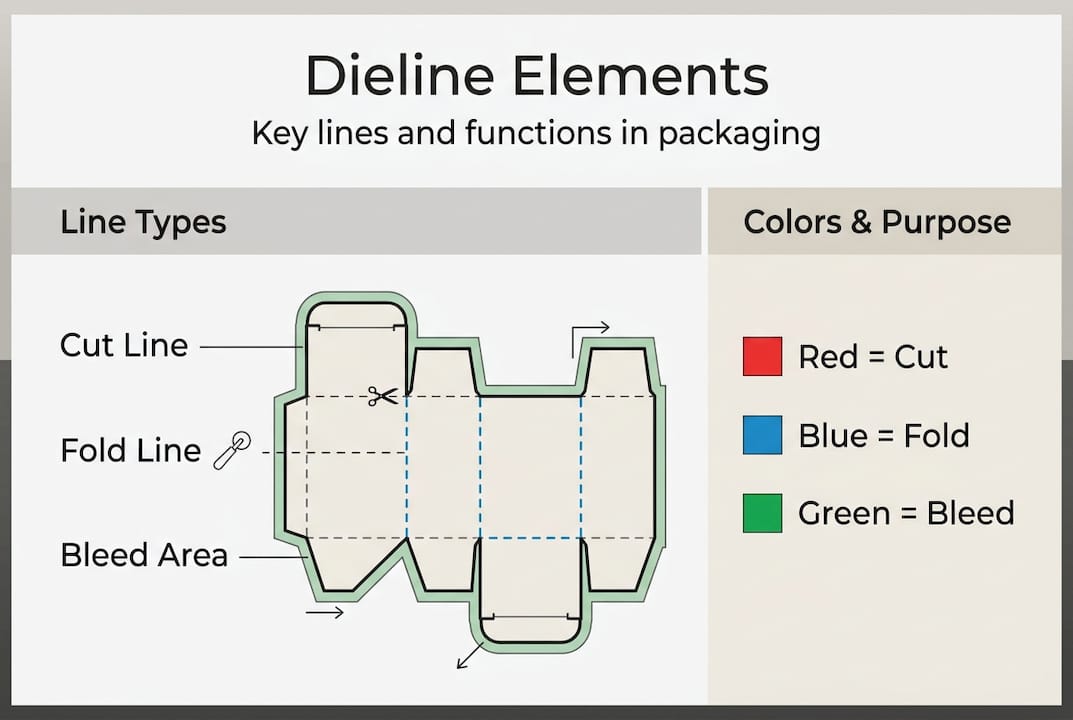
Vector paths are critical here. A vector line has a mathematically defined position, which means it scales without distortion and can be read by CNC cutting equipment. A raster line is just pixels. It looks fine on screen but has no structural meaning to a machine.
Some key reading tips for CPG teams:
- Always view the dieline in outline mode to confirm all paths are true vectors
- Check that fold lines do not overlap cut lines, which would cause tearing
- Confirm bleed lines extend at least 3mm beyond the cut boundary
- Verify that glue tab dimensions match your manufacturer's specifications
- Never place artwork directly on the dieline layer; keep them on separate layers
Pro Tip: Ask your printer to send you a sample dieline for your specific box format before you start designing. Matching their template from day one eliminates most file rejection issues.
Industry data shows that packaging production errors are disproportionately caused by file preparation issues, not press or cutting machine failures. Getting the dieline right is the single highest-leverage step you can take before artwork begins.
Avoiding common dieline errors: Quality controls for CPG teams
Even experienced teams make dieline mistakes. The difference between a minor fix and a costly reprint often comes down to whether you caught the error before or after production started. Common dieline errors include ignoring bleeds and safe zones, using non-vector paths, applying the wrong color mode, skipping version control, and placing artwork before the dieline is finalized.
Here are the most frequent mistakes, ranked by how often they derail CPG packaging projects:
- Ignoring bleed and safe zones. Artwork placed too close to the cut line gets trimmed. Text near the edge disappears. This is the most common and most avoidable error.
- Using raster paths instead of vectors. Raster-based dielines cannot be read by cutting equipment. Always work in Adobe Illustrator or a comparable vector tool.
- Wrong color mode. Dielines and final artwork must be in CMYK, not RGB. RGB files produce unpredictable color shifts when printed.
- No version control. When multiple people touch a dieline file, outdated versions get submitted. Label every file with a version number and date.
- Artwork placed before the dieline is approved. Designing artwork on an unapproved structural template means any structural change forces a full artwork redo.
Poor dielines are estimated to cause 20 to 50% more production errors per industry anecdotes, meaning the cost is not just in reprints but in delayed launches and strained supplier relationships.
For teams working to avoid costly packaging mistakes, the single most effective habit is a pre-production dieline review checklist. Before any artwork is placed, confirm that the structure is approved by both the designer and the production contact at your manufacturer.
Pro Tip: Create a shared dieline library for your brand. Store approved structural templates by SKU, material, and manufacturer. When you launch a new product, you start from a proven structure rather than rebuilding from scratch.
Version control is especially critical for CPG brands managing multiple SKUs or seasonal packaging updates. A simple naming convention like "ProductName_BoxStyle_v3_2026" prevents the nightmare of a supplier printing an outdated file.
Applying dielines: Best practices for scalable packaging design
Knowing what a dieline is and how to read it is only useful if you integrate it properly into your workflow. For CPG teams launching new products or scaling existing lines, the dieline should be the first creative asset created, not an afterthought.
A scalable packaging workflow looks like this:
- Concept: Define packaging format, material, and structural requirements
- Dieline creation: Build or source the structural template before any artwork begins
- Artwork application: Design within the approved dieline, respecting all zones
- Review: Cross-check with both design and production teams before finalizing
- Production: Submit approved, layered files with dieline and artwork separated
This sequence prevents the most common source of delays: discovering a structural problem after artwork is complete. When you lock the structure first, every downstream decision is made with confidence.
Dielines lock structure including glue flaps and grain direction, ensuring scalability. Poor dielines cause 20 to 50% higher production errors per industry anecdotes. For growing brands, this means a solid dieline library is a competitive advantage. You can launch new flavors, seasonal editions, or retail-specific variants without starting from zero each time.
For an efficient packaging workflow, shared standards matter as much as individual skill. When your design team, your printer, and your internal ops team all speak the same dieline language, projects move faster and with fewer surprises.
Pro Tip: Always review dielines with both your design lead and your production contact at the same time. A 30-minute joint review before artwork begins saves days of back-and-forth after files are submitted.
For cost-effective packaging inspiration, starting from a proven dieline also means you can focus creative energy on the artwork itself rather than troubleshooting structure. The result is faster iteration and more confident decision-making at every stage.
Why strong dielines are underrated: Our hard-won lessons
Here is what most packaging guides will not tell you: the teams that struggle most with production errors are rarely the ones with the weakest designers. They are the ones who treat dielines as a formality rather than a foundation.
We have seen brands invest heavily in beautiful artwork and then watch it fall apart because the structural template was borrowed from a similar product without verification. One mismatched glue tab dimension, one grain direction error, and the whole run is compromised. Poor dielines cause 20 to 50% higher production errors and the cost is not just financial. It is the launch delay, the supplier friction, the internal credibility lost.
The brands that scale packaging efficiently treat their structural templates as business assets. They maintain a versioned library, they involve production teams early, and they never let artwork lead structure. This is the lesson from portfolio workflow experience: precision at the structural level unlocks speed and confidence at every stage that follows. A strong dieline is not overhead. It is leverage.
Take your packaging design to the next level
If you have made it this far, you understand that dielines are not just a technical requirement. They are the foundation of every packaging decision your brand makes. Getting them right from the start saves money, accelerates launches, and gives your team the confidence to scale.

At Offcut, we built our marketplace specifically for CPG founders who need print-ready packaging concepts without the agency price tag. Every concept on our platform is designed with production in mind, meaning the structural thinking is already done. Whether you are a designer looking to sell unused packaging concepts or a founder searching for exclusive, production-ready designs, Offcut connects great work with the brands that need it most.
Frequently asked questions
What does a dieline include?
A dieline includes cut lines, fold lines, perforations, bleed areas, glue tabs, and structural details as a 2D template for packaging production.
Why must dielines use vector paths?
Vector paths ensure die-cutting machines interpret artwork accurately, reducing production errors and enabling precise cuts and folds.
How can CPG teams prevent dieline errors?
By checking bleeds and safe zones, using CMYK color mode, maintaining version control, and reviewing artwork alignment before production.
What impact do poor dielines have on packaging costs?
Poor dielines cause 20 to 50% higher production errors, leading to wasted materials, delays, and increased costs.