
Revision loops are expensive. For consumer packaged goods (CPG) founders managing multiple SKUs, regions, and retail requirements, a single packaging update can spiral into weeks of back-and-forth, missed launch windows, and agency invoices that eat into margins. The good news? CPG companies can save up to 20% on packaging costs with optimized processes. This guide walks you through a practical, step-by-step template adaptation workflow so you can cut costs, reduce errors, and get products to shelf faster.
Table of Contents
- What is a template adaptation workflow in CPG packaging?
- Key tools and requirements for effective template adaptation
- Step-by-step template adaptation workflow
- Expert strategies and automation for speed and savings
- Troubleshooting and handling complex adaptation scenarios
- Next steps: take your packaging workflow further
- Frequently asked questions
Key Takeaways
| Point | Details |
|---|---|
| Centralize assets | Using a DAM or artwork management system ensures all teams work from the latest, approved templates. |
| Automate early and often | AI and workflow automation drastically reduce adaptation errors and accelerate turnaround times. |
| Embed compliance checks | Integrating rulebooks and automated compliance checkpoints avoids costly last-minute mistakes. |
| Clone and batch | Replicating successful workflows for similar SKUs or seasonal runs saves setup effort and simplifies reviews. |
What is a template adaptation workflow in CPG packaging?
A template adaptation workflow is a structured, repeatable process for taking an approved base packaging design and modifying it for different SKUs, markets, languages, or formats without rebuilding from scratch every time. Think of it as a production playbook: everyone on your team knows the steps, the tools, and the approval gates.
Packaging workflows for CPG teams involve structured processes with tools such as Artwork Flow, starting from design briefs through to asset libraries. That structure is what separates brands that launch on time from those stuck in endless revision cycles.
Why does this matter so much? Because inefficiency compounds. A missing regulatory mark discovered at the printer costs ten times more to fix than catching it during the brief stage. Slow adaptation also delays your go-to-market timeline, which directly impacts revenue.
Here are the most common pain points brands face without a defined workflow:
- No single source of truth for approved assets, leading to outdated logos or wrong color values being used
- Unclear ownership of review and approval steps, causing bottlenecks and finger-pointing
- Manual copy-paste adaptation across SKUs, which multiplies error risk with every new variant
- Late compliance checks that trigger expensive reprints or regulatory holds
- Disconnected tools where design, legal, and production teams work in silos
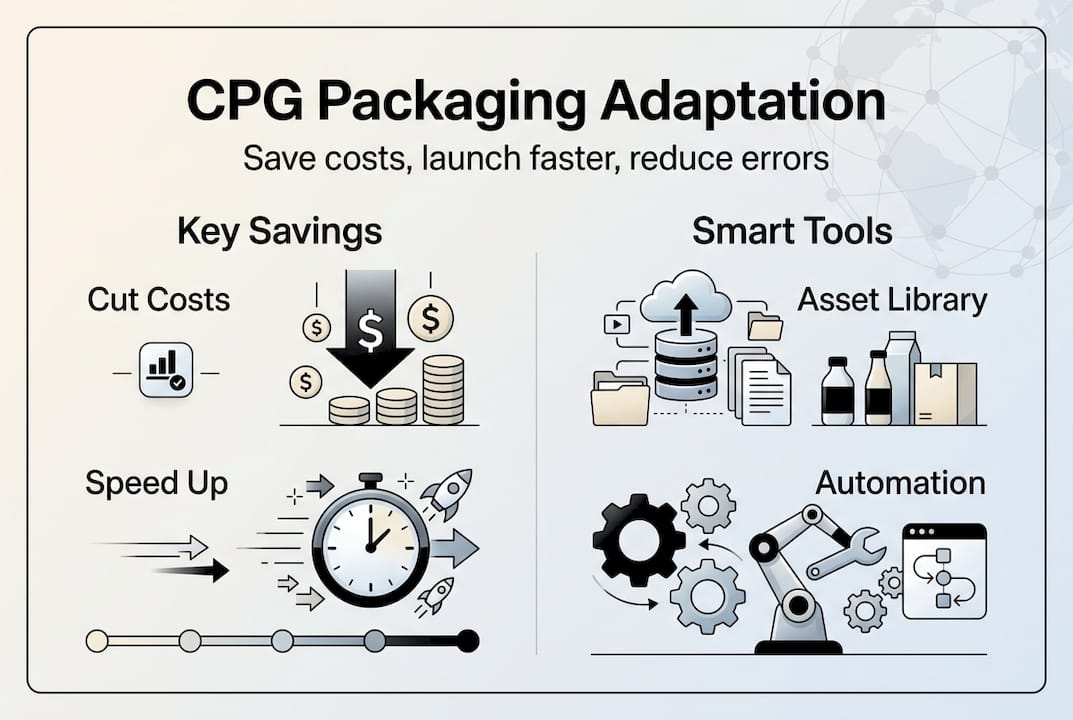
The payoff for fixing these issues is real. AI-based adaptation can cut design costs by 90% and deliver 10x faster time-to-market. Even without full AI adoption, a structured workflow alone dramatically reduces rework. For founders exploring cost-effective packaging design ideas, workflow efficiency is often the highest-leverage starting point.
| Workflow stage | Common output | Risk if skipped |
|---|---|---|
| Design brief | Approved scope document | Scope creep, rework |
| Template setup | Locked base file | Inconsistent variants |
| Compliance check | Marked-up artwork | Regulatory holds |
| Stakeholder review | Approved proof | Late-stage changes |
| Production handoff | Print-ready file | Press errors |
Key tools and requirements for effective template adaptation
Before you run a single adaptation, you need the right infrastructure. Jumping into edits without a centralized setup is how version confusion starts.
Cloning past workflows and templates, using asset libraries, and automation reduce effort and errors significantly. That principle applies whether you are a two-person startup or a brand managing 50 SKUs.

Here is a reference table of the core tools you need:
| Tool category | Purpose | Example options |
|---|---|---|
| Artwork management system | Centralize proofing and approvals | Artwork Flow, Esko |
| Design software | Create and edit templates | Adobe Illustrator, Affinity Designer |
| AI utilities | Automate resizing, text adaptation | Adobe Firefly, custom scripts |
| DAM (digital asset management) | Store and version approved assets | Bynder, Brandfolder |
| Compliance solution | Flag regulatory requirements | Lato, custom checklists |
Beyond tools, you need these foundational requirements in place:
- A clear, written brief for every adaptation request, including target market, language, SKU specs, and compliance requirements
- A locked base template in vector format, with layers organized and labeled for easy editing (see vector graphics in packaging for why this matters)
- A centralized asset library with approved logos, icons, fonts, and color palettes
- A compliance rulebook per market or retailer, updated regularly
- Defined roles so every step has a named owner
Pro Tip: Set up your DAM so that every asset has a version number and an expiry flag. When a logo gets updated, your team sees immediately which packaging files need refreshing. This single habit eliminates a huge category of costly errors. For a deeper look at what makes files production-ready, the print-ready CPG packaging essentials guide is worth bookmarking.
Step-by-step template adaptation workflow
Here is exactly how an efficient adaptation runs from first brief to approved print file.
-
Gather and validate the brief. Before anyone opens a design file, confirm the target market, SKU dimensions, language requirements, regulatory marks needed, and deadline. A vague brief is the single biggest cause of revision loops. Treat this step as non-negotiable.
-
Duplicate the base template. Never edit the master file directly. Create a named copy using a consistent file naming convention (product name, market, version, date). This protects your source of truth and makes rollbacks easy.
-
Localize and adapt for the specific SKU or region. Swap in the correct language copy, update nutritional panels, adjust net weight declarations, and apply any market-specific color or imagery requirements. For brands managing packaging consumer appeal, this is also the stage to verify that the visual hierarchy still works after text expansion or contraction.
-
Run a compliance check before internal review. Do not wait until the end. Check regulatory marks, mandatory label elements, and retailer-specific requirements at this stage. Catching a missing allergen declaration now costs minutes. Catching it after approval costs days.
-
Internal review and stakeholder approval. Route the adapted file through your defined approval chain: brand manager, legal or regulatory, and sales if retailer-specific. Use your artwork management system to track comments and sign-offs in one place.
-
Version lock and production handoff. Once approved, lock the file, archive it in your DAM with the correct version tag, and send the print-ready package to your printer or production partner. Include a preflight checklist to confirm bleed, resolution, and color mode.
AI can automate mechanicals, multilingual versions, and SKU-specific changes, freeing teams to focus on strategy rather than repetitive file work. If you are managing more than five SKU variants, batch automation at steps 2 and 3 alone can cut your adaptation time in half.
Pro Tip: Bake your compliance checklist directly into your brief template. When the person writing the brief has to confirm which regulatory marks are required upfront, compliance errors drop dramatically before design even starts.
Unclear briefs and delayed compliance checks are not just inconveniences. They are the two most expensive line items in any packaging adaptation budget. Every revision loop triggered by a vague scope or a late-stage regulatory catch adds days to your launch and dollars to your cost. Fix the front end of your workflow and the back end takes care of itself.
For founders building this process from the ground up, the step-by-step CPG design guide covers the broader design context that feeds into adaptation.
Expert strategies and automation for speed and savings
Once your core workflow is running, these strategies multiply its impact.
The biggest lever is automation. AI tools handle the repetitive mechanical work: resizing artwork for different pack formats, generating multilingual text variants, and applying SKU-specific data fields. Empirical benchmarks show AI tools offer 10x faster time-to-market and 90% lower design costs for brands that adopt them systematically.
Here is how manual and automated workflows compare in practice:
| Factor | Manual workflow | Automated workflow |
|---|---|---|
| Adaptation time per SKU | 4 to 8 hours | 30 to 60 minutes |
| Error rate | High (human copy-paste) | Low (rule-based logic) |
| Cost per variant | High | Significantly reduced |
| Scalability | Limited | Scales with SKU volume |
| Compliance consistency | Variable | Consistent |
Beyond automation, these strategic shortcuts make a real difference:
- Batch adaptation: Group similar SKU variants and adapt them in a single session rather than one at a time. This reduces context-switching and keeps your team in flow.
- Shared compliance rulebooks: Maintain a living document per market that your entire team references. When regulations change, update one document and everyone benefits.
- Clone past successes: When a previous adaptation ran smoothly, save that workflow as a template. Reuse the file structure, naming convention, and approval chain for future projects.
- Standardize brief formats: A consistent brief template means less back-and-forth before work starts.
For founders focused on cutting packaging design costs, automation is not a luxury. It is the most direct path to sustainable margins at scale.
Troubleshooting and handling complex adaptation scenarios
Even well-designed workflows hit friction. Here is how to handle the most common failure modes.
Edge cases include varied compliance, seasonal urgency, and structural packaging changes. Vague briefs and late compliance errors cause revision loops that derail timelines and inflate costs.
Common problems and their fixes:
- Missing regulatory marks: Build a per-market compliance checklist into your brief template. Make it a required field, not an optional reminder.
- Version confusion: Enforce strict file naming conventions and archive every approved version in your DAM. Never allow files to live on personal desktops.
- Unclear roles: Document who owns each workflow step. When everyone assumes someone else is handling compliance review, no one does.
- Last-minute structural changes: If a pack format changes (say, from a pouch to a box), treat it as a new project, not an adaptation. Trying to force a structural change through an adaptation workflow creates compounding errors.
- High SKU volume pressure: Use batch processing and automation to handle volume. Trying to manually adapt 20 SKUs under a tight deadline is where the most expensive mistakes happen.
- Multi-region compliance conflicts: When a single product ships to markets with conflicting label requirements, create market-specific template variants rather than trying to accommodate everything in one file.
Embedding compliance checkpoints at the brief stage and maintaining a centralized asset library are not process overhead. They are the two practices that most reliably prevent the costly late-stage errors that derail launches. Brands that skip them pay for it every single time.
For a broader look at what goes wrong in packaging projects, avoid packaging design mistakes covers the most common and expensive errors founders make. And if your designs feel cluttered after adaptation, CPG packaging whitespace tips can help you restore visual clarity without a full redesign.
Next steps: take your packaging workflow further
Building a tight template adaptation workflow takes upfront effort, but it pays back every time you launch a new SKU, enter a new market, or refresh a product line. The brands that scale efficiently are the ones that treat packaging production as a system, not a series of one-off projects.
That is exactly where Offcut fits in. Instead of commissioning expensive agency concepts from scratch, founders get access to exclusive, print-ready packaging designs at a fraction of the cost. These are real concepts built by professional designers, ready to adapt into your workflow immediately. If you are a designer with strong packaging work sitting unused, Offcut for designers is how you turn that work into income. For brands, it means skipping the blank-canvas phase entirely and jumping straight to adaptation, which is where your new workflow shines.
Frequently asked questions
What is the main benefit of a template adaptation workflow for CPG brands?
A structured workflow cuts packaging costs, speeds up launches, and reduces errors compared to manual, ad hoc adaptations. Global CPG brands have saved 20% on packaging costs through optimized processes alone.
How does AI improve template adaptation in packaging design?
AI accelerates template adaptation by automating mechanicals, multilingual versions, and SKU variations, freeing design teams to focus on strategy rather than repetitive file work.
What are the biggest risks in template adaptation workflows?
Vague briefs, missed compliance checks, and poor version control cause costly revision loops and late-stage errors. Vague briefs and late compliance errors are the most common triggers for expensive rework.
What tools make template adaptation most efficient?
Artwork management systems, DAMs, and AI-powered automation ensure reliability, speed, and consistent compliance. Template adaptation workflows in CPG packaging use systems like Artwork Flow and asset libraries to manage approved versions across teams.