
TL;DR:
- Packaging print failures often lead to costly reprints that eat into profit margins and cause delays.
- By implementing disciplined file preparation, choosing the right print method, and optimizing run sizes, brands can reduce costs and improve quality.
- Systematic processes, proactive quality checks, and batch planning are essential for consistent print success and operational efficiency.
Packaging print failures are expensive teachers. A missed bleed here, a wrong color mode there, and suddenly you're staring at a full reprint bill that eats your margin before a single unit hits the shelf. For CPG entrepreneurs, print production isn't just a technical detail — it's a direct line to profitability. The gap between a smooth production run and a costly rework almost always comes down to preparation, process selection, and a few strategic decisions made early. This article walks you through the most impactful, practical steps to get better results and spend less doing it.
Table of Contents
- Master your file prep and prepress workflow
- Choose the right print method for your run
- Plan print runs to minimize waste and inventory costs
- Cut ink and finishing costs with batch planning
- Prevent edge-case failures: Barcodes, coatings, and quality assurance
- Why print production success is a systems game, not a one-off checklist
- Take your packaging print to the next level with Offcut
- Frequently asked questions
Key Takeaways
| Point | Details |
|---|---|
| File prep matters most | Precise prepress controls prevent nearly all costly print mistakes and delays. |
| Print method fits the run | Choose digital for small, fast jobs and traditional for high volume to balance quality and cost. |
| Right-size every order | Avoid waste and inventory loss by aligning print runs to actual market need. |
| Smart batching saves big | Group SKUs for printing to cut ink, time, and setup costs across projects. |
| QA from file to finish | Validate barcodes and durability after finishing to catch issues before they ship. |
Master your file prep and prepress workflow
Every print failure has a paper trail, and it almost always starts at the file. Packaging prepress guidance consistently identifies file preparation quality as the primary lever for preventing reprints and costly delays in CPG packaging. That means if you fix prepress, you prevent the majority of expensive downstream problems before they ever reach the press.
Start with your dieline. A dieline for packaging is the structural blueprint of your package, showing exactly where the print sheet will be cut, folded, and scored. If your artwork doesn't align perfectly with the correct dieline, you will get structural misprints, cut-offs, or design elements landing in wrong positions. Lock this down before anything else.
Next, verify your bleed and safe zones. Bleed (typically 3mm or 0.125 inches beyond the cut line) ensures that color or graphics extend fully to the package edge with no white gaps after trimming. Safe zones keep important text and logos far enough from the cut line to survive trimming variation. These are non-negotiable basics that are still overlooked regularly.
Color mode is another common culprit. RGB looks great on screen but prints poorly. Convert all artwork to CMYK before delivery, or specify exact Pantone codes if brand color accuracy is critical. Images must be at least 300 DPI at final print size. Lower resolution images look sharp on screen but pixelate or look muddy on press.
Fonts must be embedded or converted to outlines. A printer who doesn't have your font installed will substitute, and that substitution won't look like what you approved.
Use a print-ready file preparation checklist every time, without exception. The checklist should cover:
- Correct dieline version confirmed with printer
- Bleed set to printer's specification
- Safe zones verified for all critical text and logos
- Color mode converted to CMYK or Pantone confirmed
- All images at 300 DPI minimum
- All fonts embedded or outlined
- Layers flattened and files saved in accepted format (PDF/X-1a is standard for most printers)
- Preflight run in Adobe Acrobat or similar tool
Pro Tip: Never skip the physical or digital proof stage. One uncaught error can trigger a full-batch reprint. A single proof, even a digital soft proof, is the lowest cost insurance policy in your entire production workflow.
"A four-stage prepress workflow covering preparation, color management, imposition, and output consistency prevents downstream problems by enforcing technical standards before files reach plate-making and press." — Prepress workflow optimization guidance
The design essentials behind print-ready packaging aren't complicated, but they require discipline and a repeatable process, not just a one-time effort.
Choose the right print method for your run
With prep workflow locked down, choosing your print process is the next lever for budget and brand impact. The wrong choice can add thousands in unnecessary setup costs or price-per-unit that kills your margins at scale.
Here's how the main print methods compare for CPG packaging:
| Print method | Best for | Typical setup cost | Per-unit cost at scale | Substrate flexibility |
|---|---|---|---|---|
| Digital | Short runs, rapid iteration | $0–$150 | Higher | Moderate |
| Flexographic | Mid to large runs, bags, films | $1,000–$5,000+ | Low | Very high |
| Lithographic | High-quality folding cartons | $1,500–$4,000 | Medium | Paper/board |
| Gravure | Premium, high-volume, continuous tone | $5,000–$50,000+ | Very low | Film, foil |
Packaging cost modeling shows that digital setup costs can run as low as $0 to $150, making it the clear winner for smaller founders testing SKUs or launching limited editions. But that math flips quickly at volume.
Flexo is the workhorse of the packaging world. It handles flexible films, bags, labels, and cartons efficiently, and comparative analysis of print methods confirms that flexo is broadly compatible across substrates and becomes highly efficient at longer runs. Gravure delivers stunning, photographic-quality results for premium brands at very high volumes, but the plate-making costs are significant and only make sense above certain thresholds.
The key decision factors when selecting a print method:
- Run size: Under 5,000 units, digital almost always wins on total cost. Over 20,000 units, explore flexo seriously.
- Substrate: Not all methods work on all materials. Confirm compatibility before committing.
- Color complexity: Gravure excels at gradients and photographic imagery. Flexo has improved dramatically but still has limitations with very fine detail.
- Speed to market: Digital requires no plates, so turnaround is faster. Flexo and gravure require plate-making time.
- Versioning needs: If you're running multiple SKU variants, digital allows each version to print without extra setup cost.
Pro Tip: If you're testing a new product line, start with digital to validate the design on shelf, then switch to flexo or litho once volume justifies the setup investment. This approach protects your cash flow and allows affordable file setup without locking in expensive plates on an unproven SKU.
Plan print runs to minimize waste and inventory costs
Once you've selected a print method, optimizing the run itself can yield both cost and sustainability gains. One of the most common and expensive mistakes in CPG packaging is overprinting, which leads to surplus inventory that becomes obsolete when formulas change, regulations update, or labels get redesigned.
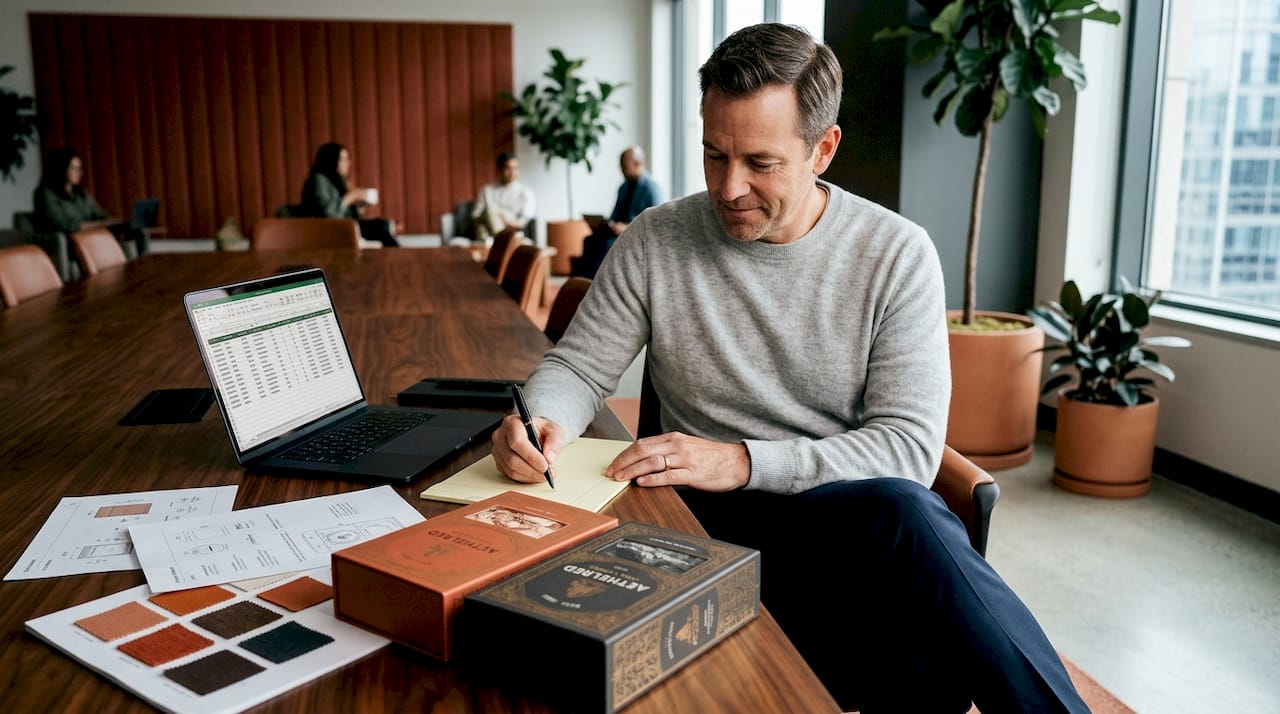
Sustainable packaging economics highlight a real tension: traditional printing rewards volume with lower per-unit pricing, which pushes brands to over-order. The result is warehouses full of packaging that eventually goes to waste. Right-sizing your run is a discipline that saves money now and reduces environmental cost.
Here's a practical approach to calculating your print volume:
- Start with confirmed demand. Use your sales forecast for the specific product and timeframe. Don't inflate.
- Add lead time buffer. Factor in how long it takes to reorder and receive packaging. Add a buffer for that window only.
- Account for production waste. Most printers include standard waste in quoted quantities, but confirm this. Add 2–5% for internal production defects or testing.
- Subtract existing inventory. Count what you already have in stock before ordering more.
- Set a hard ceiling. Decide the maximum surplus you're comfortable holding, expressed in weeks of supply, not just unit count.
- Reassess SKU stability. If a formula, regulatory requirement, or brand refresh is coming within the next 6 months, reduce the run accordingly.
On-demand and short-run digital printing has made it genuinely viable to match packaging supply closely to actual demand for seasonal products, limited editions, or new product launches. The higher per-unit cost is often worth it when you factor in the carrying cost of excess inventory and the write-off risk of obsolete stock.
Pro Tip: Build in a buffer, but treat overage as a last resort, not your default plan. Systematically reducing print run sizes by even 10–15% can free up significant working capital across a product portfolio.
Exploring portfolio workflow strategies can help you structure decisions across multiple SKUs more effectively. Also consider repurposing designs where existing artwork can extend the useful life of previous investment rather than starting from zero each time.
Cut ink and finishing costs with batch planning
Beyond how much you print, how you schedule and set up SKUs can directly impact costs and time to market. Ink changeovers are one of the most underrated cost drivers in packaging production. Every time a press switches from one ink set to another, it requires cleaning, setup, and test runs that consume time, materials, and press capacity.
The solution is batch planning: grouping SKUs that share similar ink profiles or finishing requirements and running them in sequence on the same press setup. This reduces changeover frequency and slashes the associated downtime and waste.
Printing optimization research for FMCG packaging suggests that monitoring ink selection and using print coverage calculation software can reduce printing costs by 10–20%. That's a meaningful number. On a $50,000 annual print spend, that's $5,000 to $10,000 recovered without changing your design.
Practical ways to reduce ink and finishing costs through batch planning:
- Audit your SKU portfolio and identify which products share the same brand colors, spot colors, or Pantone references.
- Schedule similar SKUs together in the production calendar so they can run back to back on the same press configuration.
- Standardize finishes across product lines where possible. If half your SKUs have a matte laminate and half have gloss, consolidating to one finish type reduces the finishing passes needed.
- Monitor ink coverage using your prepress software. Designs with very high coverage (dark backgrounds, heavy gradients) use more ink and increase cost per unit. Optimizing ink coverage in artwork, even slightly, compounds across large runs.
- Centralize approvals. Delayed sign-offs break up production batches and force costly press re-setups. Build a clear, fast approval process.
Pro Tip: Talk to your printer about how they sequence runs and whether they can group your SKUs into a single production session. Many printers are happy to accommodate this if you bring it up proactively. It saves them setup time too, so there's often room to negotiate a better rate in exchange for scheduling flexibility.
Check out artwork streamlining tips for specific ways to optimize your design files before they reach press.
Prevent edge-case failures: Barcodes, coatings, and quality assurance
Even after nailing the big-picture process, small oversights at the end can sink a great print run. Barcode failures, coating-induced defects, and shelf-durability problems are the most painful because they often don't surface until after production is complete.
Barcodes deserve special attention. The quiet zone — the blank space surrounding a barcode — must meet minimum specifications or scanners will fail. This seems obvious in artwork review, but coatings and varnishes applied during finishing can visually close the quiet zone or reduce contrast enough to cause scan failures in the real world.
Barcode and label failure analysis confirms that a significant portion of barcode failures trace directly to contrast issues introduced after topcoat or ink gain, and to quiet zones that are too narrow once finishing is applied.
"Major barcode failures often trace back to topcoat or quiet-zone missteps in production rather than design — the artwork looks fine, but the finished package fails the scanner."
Key quality assurance checkpoints for the final production stage:
- Test barcodes on finished samples, not just digital artwork. Use a real barcode verifier on the printed and coated package.
- Check contrast after finishing. Matte varnishes, flood coats, and certain laminate films all affect the way ink appears. A dark barcode on a slightly transparent film might fail contrast thresholds in certain lighting.
- Validate durability claims. If your packaging needs to withstand refrigeration, thermal cycling, abrasion (e.g., from shipping), or UV exposure, run physical tests on finished samples before committing to the full run.
- Check legibility of small text after coating is applied. Fine print on nutritional panels or ingredient lists can become illegible with certain finishing treatments.
- Get a signed press proof. This protects you legally and operationally if output deviates from what was approved.
Cost-effective label design choices and solid workflow improvement strategies both reinforce the value of building QA checks into your standard operating procedure, not treating them as optional.
Why print production success is a systems game, not a one-off checklist
Here's the uncomfortable truth most production tip articles skip: the brands that consistently get packaging right aren't just following a better checklist. They've built a system where mistakes generate process improvements, not just frustration.
Most print issues aren't freak accidents. They're process breakdowns that repeat until someone institutionalizes the fix. A missed font conversion isn't a designer being careless; it's a workflow that doesn't require font outlining before file delivery. A barcode failure after coating isn't bad luck; it's a QA process that only checks artwork and not finished samples.
The entrepreneurs who outperform in CPG print production are the ones who treat every failure as a data point, update their prepress checklist or vendor brief accordingly, and make sure the lesson is captured in a format that survives staff turnover. They train designers and vendors on the same standards. They build approval workflows that don't let files leave without a preflight pass.
The temptation is always to treat cost savings as a negotiation tactic. "Can you do it cheaper?" is a less powerful question than "How do we reduce rework, changeovers, and inventory write-offs?" The second question is a systems question, and it yields compounding returns over time.
Print-ready packaging design essentials matter, but only if they're embedded in a repeatable process. One-off wins are real but fragile. Systematic wins are durable.
Take your packaging print to the next level with Offcut
Ready to put these tips into action and modernize your own print workflow? The biggest barrier for most CPG founders isn't knowledge — it's access to high-quality, print-ready packaging design without the agency price tag or the six-week timeline.
Offcut is built for exactly this moment. Founders get exclusive, print-ready CPG packaging concepts at a fraction of agency cost, while designers get compensated for work that would otherwise sit unused on a hard drive. Every design in the marketplace is production-ready, meaning the file prep, dielines, and color modes are already handled correctly. If you're a designer with unused packaging concepts, you can submit your unused packaging designs and turn shelf-sitter files into real revenue. For founders, it's the fastest path from concept to print-ready file without burning budget on from-scratch creative work.
Frequently asked questions
What's the most common cause of CPG print production delays?
Mistakes in initial file preparation — especially with dielines, bleed, color mode, and fonts — are the top reason for costly print delays and reprints, as packaging prepress guidance consistently confirms. Fixing prepress discipline is the single highest-leverage improvement most brands can make.
Does digital printing always cost less for CPG packaging?
For short runs, digital is almost always cheaper given setup costs as low as $0 to $150, but on large runs, traditional methods like flexo deliver much lower cost per unit. The crossover point depends on your specific run size and substrate.
How do I prevent barcode scan failures after packaging is finished?
Ensure correct quiet zones and strong contrast in your design, then test finished samples after printing and after application of all coatings or varnish. Barcode failure analysis shows most failures happen at the finishing stage, not in the artwork itself.
How can I cut print costs without sacrificing quality?
Plan batch runs by grouping SKUs with similar ink profiles, monitor ink coverage to avoid over-inking, and right-size run volumes to avoid surplus inventory. FMCG print optimization research shows these strategies can reduce printing costs by 10–20%, which beats most price negotiation outcomes.