
TL;DR:
- A structured packaging workflow prevents costly errors, ensuring regulatory compliance, quality, and efficiency. Founders should focus on early stakeholder alignment, digital collaboration tools, parallel reviews, and physical dieline testing to future-proof their processes. Combining disciplined organizational practices with technological solutions minimizes risks, reduces costs, and accelerates product launches.
One wrong font swap. A missing allergen warning. A dieline that doesn't fold the way the printer expected. Each of these errors can trigger costly reprints, compliance fines, or a full product recall. For CPG founders, a broken packaging artwork process isn't just a design headache, it's a direct hit to your margins and your launch timeline. This guide walks you through every stage of a structured, efficient artwork workflow so you can ship packaging that looks great, meets regulations, and doesn't blow your budget in the process.
Table of Contents
- What you need before starting the packaging artwork process
- Step-by-step workflow: Structured stages of packaging artwork
- Parallel vs sequential reviews: Reducing delays and errors
- Verification: Pre-press, proofs, and final archiving
- A fresh perspective: How founders can future-proof packaging artwork workflows
- Enhance your workflow with OffCut
- Frequently asked questions
Key Takeaways
| Point | Details |
|---|---|
| Centralized tools save time | Switching to digital proofing platforms streamlines collaboration and reduces costly errors. |
| Parallel reviews boost efficiency | Use parallel routes for stakeholder review to eliminate bottlenecks and version confusion. |
| Audit trails secure compliance | Maintaining thorough digital records ensures FDA and legal adherence, shielding against liability. |
| Physical prototypes prevent flaws | Always test dielines physically to catch issues before mass production, saving money and trouble. |
| AI proofing reduces recalls | Integrate AI tools for early error detection to avoid costly late-stage revisions or product recalls. |
What you need before starting the packaging artwork process
Getting your packaging artwork right starts long before anyone opens a design file. The founders who consistently avoid costly errors are the ones who invest time upfront, gathering the right tools, assembling the right team, and locking in the right information before a single layer is created.
Essential tools and platforms
Your toolkit shapes how fast and accurately your team moves. At a minimum, you need a centralized proofing platform (Ziflow, Filestage, or similar), a project management tool (Asana, Monday, or Notion), a shared cloud drive for assets, and dieline templates from your printer. Relying on email threads and spreadsheets feels manageable at first, but it quickly becomes a liability.
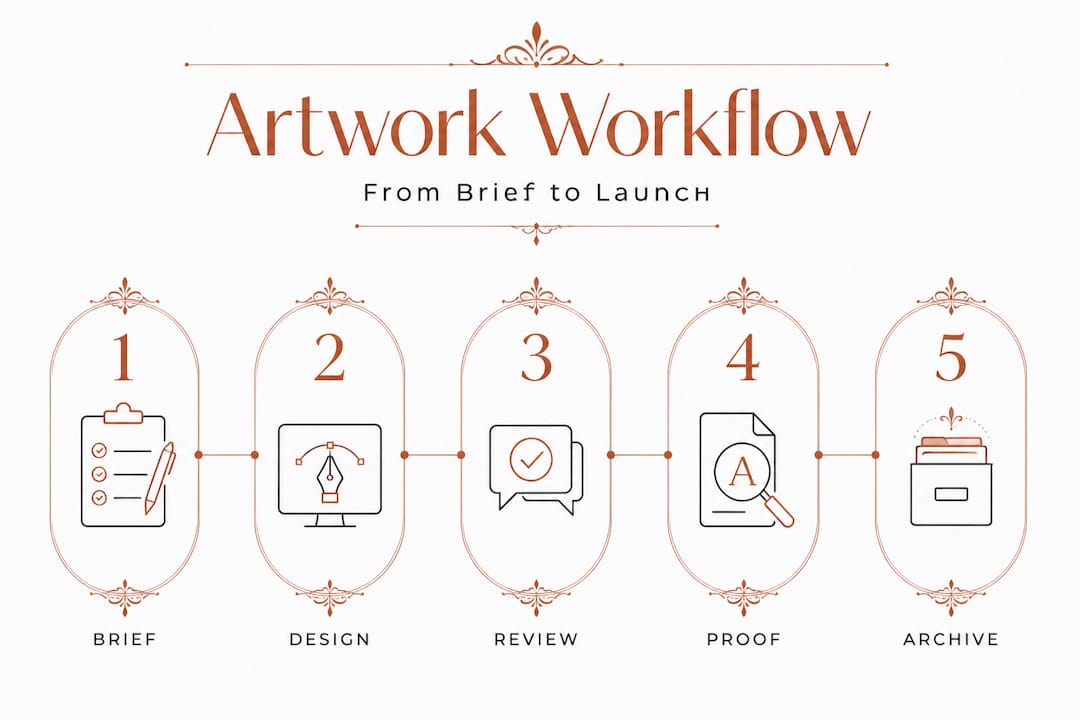
The packaging design process typically involves 6 to 8 structured stages: brief creation, design and concept, internal creative and brand review, legal review, regulatory compliance review, stakeholder sign-off, pre-press and printer proof, and final handoff and archiving. Each stage requires a different tool and a different set of eyes.
Team roles you must define
| Role | Responsibility |
|---|---|
| Designer | Creates and revises artwork files |
| Brand lead | Ensures visual consistency and brand guidelines |
| Compliance officer | Reviews regulatory and legal requirements |
| Project manager | Tracks timelines, approvals, and file versions |
| Printer/pre-press partner | Validates technical specs before production |
Skipping any of these roles, or letting them blur together, is where expensive mistakes creep in. If you're working with a freelance designer, clarify upfront who owns compliance review. A solid designer portfolio workflow makes it easier to evaluate whether a designer already understands CPG-specific requirements before you hire.
Critical information to gather before day one
Before opening a single design file, lock down your brand guidelines, all legal copy requirements (ingredient lists, certifications, net weight), your retailer's shelf specifications, and your printer's technical requirements (bleed, color mode, resolution). Knowing how to source packaging design efficiently also matters here because starting with pre-vetted, print-ready concepts can cut your brief-to-proof timeline significantly.
Pro Tip: Build a single "artwork brief" document that compiles every piece of required information in one place. Share it with every stakeholder before the first design concept is created. This alone eliminates a huge percentage of revision cycles.
Step-by-step workflow: Structured stages of packaging artwork
Once you have your prerequisites in place, the workflow itself needs to be sequential, documented, and repeatable. Founders who treat each launch as a one-off, figuring it out as they go, spend twice as long on artwork as those who follow a defined process.
Here's a practical numbered workflow to follow:
- Create the brief. Define the SKU, target customer, shelf context, required claims, and any regulatory mandates. Share with all stakeholders.
- Design and concept development. The designer creates initial concepts based on the brief, brand guidelines, and dieline specs.
- Internal creative and brand review. Your brand lead checks visual consistency. Flag issues here, not later.
- Legal review. Legal counsel or a regulatory expert reviews all copy claims, certifications, and mandatory statements.
- Regulatory compliance review. Confirm all label requirements are met for the markets you're selling into (FDA, TTB, USDA depending on category).
- Stakeholder sign-off. All required approvers formally approve the artwork version. This is a documented, trackable step, not a casual "looks good" reply.
- Pre-press and printer proof. Your printer validates the file for production. You review a physical or digital proof.
- Final handoff and archiving. Submit production files and archive all versions with full audit trail.
Manual vs digital: Why it matters
Comparing these two approaches reveals a significant gap in efficiency and risk.
| Criteria | Manual (email/spreadsheets) | Digital (centralized platform) |
|---|---|---|
| Version control | Error-prone | Automated and tracked |
| Compliance documentation | Manual logs | Automatic audit trail |
| Review speed | Sequential, slow | Parallel, faster |
| Error rate | High | Significantly reduced |
| Regulatory compliance | Difficult to prove | FDA CFR Part 11 ready |
Manual workflows using email and spreadsheets cause a 20% loss to versioning errors alone, while digital systems with audit trails ensure FDA CFR Part 11 compliance. That's not a minor inconvenience. That's one in five files at risk of going to print with outdated or incorrect information.
For a deeper look at how to structure each stage, the step by step packaging design guide covers startup-specific nuances worth reviewing. And if you want to optimize the pace of your entire operation, packaging design workflow strategies outlines practical approaches that reduce revision cycles without sacrificing quality.
Pro Tip: Integrate AI proofing tools at stage two, not at the end. Catching text errors, barcode readability issues, or missing mandatory statements early means you fix them when it's cheap, not after legal review has already signed off on a flawed file.
Parallel vs sequential reviews: Reducing delays and errors
Most CPG founders default to sequential reviews because it feels organized. Legal sees it, then brand, then the CEO. But sequential reviews are one of the most common hidden time-killers in packaging artwork. Each handoff introduces waiting time, and any one reviewer can hold up the entire process.

Why parallel reviews win
Parallel reviews using centralized proofing tools reduce delays compared to sequential reviews, eliminating version confusion and enabling efficient multi-stakeholder coordination. Instead of waiting for legal to finish before brand sees the file, both teams review the same version simultaneously, leave their comments in one place, and you resolve conflicts in a single consolidated pass.
The tools that make this possible share a few core features:
- Real-time annotation directly on the artwork file
- Role-based permissions so reviewers see only what's relevant to them
- Version locking so no one can accidentally open an old file
- Timestamp-based comment threads for each reviewer
- Automated approval status tracking
"The biggest time savings in packaging artwork don't come from designing faster. They come from reviewing smarter."
When multiple reviewers work simultaneously on a single, centralized version, you compress a process that used to take two to three weeks into a matter of days. That matters enormously when you're racing a retail shelf date or trying to respond to a competitor's launch.
Common bottlenecks and how to remove them
One of the sneakiest bottlenecks is getting compliance into the loop too late. When legal or regulatory review happens after multiple creative revisions, any required changes force the design team to restart work that should have been locked. Learning how to improve packaging workflow often starts with simply repositioning compliance as an early-stage check rather than a final gate.
Another common issue is having too many approvers at the final sign-off stage. If you're waiting on five people to give a green light, your process has already broken down upstream. Final sign-off should be a formality. If it's where debates are still happening, the review process failed.
If you're managing artwork costs and want to reduce agency dependency, learning to sell packaging design without large fees is worth your time.
Pro Tip: Bake compliance review into stage three, right alongside the internal brand review. Yes, it feels early. But finding a claims issue at week one versus week four is the difference between a free text edit and a full redesign.
Verification: Pre-press, proofs, and final archiving
You've completed your reviews. Everyone has signed off. It feels like the finish line. But verification is where even well-run processes can fall apart if you rush. Pre-press, proofing, and archiving are not bureaucratic formalities. They are your last line of defense against production errors.
Verification checklist
Before sending files to print, work through each of these:
- Audit trail confirmed. Every approval is logged with a timestamp and reviewer identity.
- Color mode verified. All files converted to CMYK (or Pantone where specified). No RGB files going to print.
- Bleed and safe zone reviewed. All critical content sits inside the safe zone. Nothing important bleeds into the trim area.
- Barcode scan test completed. Every barcode scanned in multiple lighting conditions to confirm readability.
- Printer proof approved. Either a physical press proof or a certified digital proof reviewed and signed off.
- Dieline physically tested. A printed dieline cut and folded manually to check structure, closures, and panel alignment.
- Final file archived. All production-ready files stored with a clear version name, date, and linked approval records.
Why physical dieline testing is non-negotiable
In regulated CPG, audit trails protect against liability, and testing dielines physically catches fold and scan issues before production. Screens lie. Colors look different on a monitor than on the shelf. A panel that looks perfectly spaced in Illustrator might overlap awkwardly when folded. A barcode that passes digital validation can still fail a physical scanner in certain retail environments.
Understanding the full purpose of dielines for packaging helps clarify exactly what you're testing and why. And before you send anything to your printer, reviewing how to prepare packaging files correctly ensures your handoff is clean and production-ready the first time.
Archive like it matters, because it does
Your archive is not just storage. It's your compliance record, your version history, and your starting point for every future SKU revision. Name files with a clear convention: SKU name, version number, approval date. Link each archived file to its corresponding approval record. When a regulatory body asks for your artwork history or when you need to relaunch a SKU two years from now, you'll be grateful you did this properly.
Pro Tip: Use digital audit trails as active brand protection, not passive record-keeping. If a retailer or regulator questions a label claim, your audit trail shows exactly what was approved, by whom, and when. That documentation is worth far more than you'd expect.
A fresh perspective: How founders can future-proof packaging artwork workflows
Here's something most packaging guides won't tell you: technology solves maybe 70% of your artwork workflow problems. The other 30% is organizational discipline and physical diligence.
Every year, new AI-powered proofing tools promise to eliminate errors before they happen. And they do catch a lot. But no platform catches the product manager who verbally approved a copy change and never logged it, or the designer who updated one panel and forgot the back. Those failures are human, and they require human systems to prevent them.
The founders building the most resilient packaging workflows are doing two things simultaneously. First, they're using centralized digital platforms to eliminate the version chaos that kills teams working on email. Platforms with parallel review, automated audit trails, and role-based permissions genuinely compress timelines and reduce errors. Understanding visual impact packaging also becomes easier when your review process gives every stakeholder a consistent, accurate view of the artwork.
Second, they're refusing to skip physical checks. A printed dieline folded by hand takes ten minutes and can save you from a $50,000 production run that doesn't close properly. A barcode scan test with a $30 scanner catches issues that expensive software misses. These analog checks are not signs of an outdated process. They're signs of a mature one.
There's also an undervalued long-term strategy hiding in your old artwork. Most brands accumulate shelves of unused concepts, rejected designs, and iteration files that never made it to production. Rather than letting them decay on a hard drive, there are smart ways to repurpose packaging designs for new SKUs, seasonal variants, or limited editions. That's not just a cost-saving move. It's a way to maintain design coherence across a growing product line without starting from scratch every time.
The future-proof workflow is not the one with the most sophisticated software. It's the one your team actually follows, consistently, launch after launch.
Enhance your workflow with OffCut
Getting your packaging artwork process right is one of the highest-leverage investments you can make as a CPG founder. Fewer errors, faster approvals, and lower revision costs all compound over time. But building a strong process also means starting with strong design assets.
At OffCut, we give CPG founders access to exclusive, print-ready packaging concepts at a fraction of what agencies charge. Every design on the platform has been created by professional designers and is ready to enter your artwork workflow immediately, with no concept development phase eating up your budget or timeline. And for designers, selling unused packaging concepts through OffCut means that great work finds a home instead of sitting on a hard drive. If you're looking to shorten your brief-to-shelf timeline and reduce artwork costs, OffCut is the practical next step.
Frequently asked questions
What is the first step in the packaging artwork process?
The first step is creating the brief, which sets the goals, guidelines, and requirements for the design team. The packaging artwork process follows 6 to 8 structured stages, and a strong brief ensures every stage after it moves efficiently.
How can I avoid errors during the artwork review process?
Switch to centralized, digital review tools that allow parallel reviews, and move compliance checks to earlier in the process. Parallel reviews with centralized tools eliminate version confusion and enable efficient multi-stakeholder coordination in ways that email simply cannot.
Why are audit trails important in packaging artwork workflows?
Audit trails maintain regulatory compliance and protect against legal liability for CPG brands. Digital systems with audit trails also reduce the 20% loss that manual, email-based workflows typically experience due to versioning errors.
Should dielines be tested physically before production?
Yes, always test dielines physically to catch fold or scan issues before manufacturing begins. Even well-validated digital files can reveal unexpected structural problems once they are printed and folded by hand, as pre-production dieline testing confirms.
How does AI proofing fit into the artwork process?
AI proofing tools detect possible errors early in your digital workflow, helping reduce costly revisions and recalls. For CPG founders, integrating AI proofing early, ideally at the concept stage rather than pre-press, delivers the greatest reduction in downstream correction costs.